

Workforce Roles Management: Strategies for Effective Planning
Discover how workforce roles management improves role clarity, compensation planning, and collaboration between HR and Finance teams for better decisions.
Most People Ops and HR leaders struggle to connect workforce decisions with real business impact. Hiring plans sit in one system, compensation data lives in spreadsheets, and role definitions evolve faster than teams can track them.
With McKinsey estimating that nearly 87% executives already see or expect workforce capability gaps, the pressure to align roles with actual business needs is increasing. This disconnect makes it harder to see how role changes impact pay, budgets, and hiring timelines.
Workforce roles management has moved beyond basic scheduling or tracking headcount. It now plays a central role in how teams plan compensation, structure roles, and forecast hiring needs. When done well, it helps HR and Finance teams make clearer decisions about who to hire, how to pay them, and when to scale.
This blog explores how workforce management works today, the roles involved, and the strategies that support better planning decisions.
At a Glance:
- Workforce roles management connects hiring, compensation, and budgeting by aligning role definitions, pay structures, and headcount decisions across HR and Finance teams.
- It is built using core components such as workforce planning, job architecture, compensation frameworks, analytics, and structured approval workflows.
- Multiple stakeholders, such as HR leaders, finance teams, HRBPs, recruiters, and analysts, work together to keep workforce decisions consistent and well-informed.
- Modern strategies include data-led planning, skills-based role design, scenario-based hiring models, and stronger cross-functional alignment across teams.
- Organizations rely on tools like HRIS, ATS, and compensation systems, but still face challenges like limited visibility, slow approvals, and inconsistent role benchmarking.
What is Workforce Management and Why It Matters?
Workforce management refers to how organizations plan, structure, and track their workforce to meet business goals. It includes defining roles, aligning responsibilities, and connecting those roles to compensation and headcount decisions.
Here’s why it matters:
- Role structure: Defines job levels, responsibilities, and reporting lines so teams can scale with consistency and clarity.
- Compensation alignment: Connects each role to pay bands and salary ranges, helping teams make consistent and transparent pay decisions without ambiguity.
- Hiring alignment: Links hiring decisions to headcount plans, making it easier to evaluate budget impact before approvals.
- Cost visibility: Provides a clearer view of workforce costs, helping teams understand the financial impact of every role.
- HR–Finance collaboration: Creates shared workflows and data visibility, improving alignment between HR and Finance teams.
- Consistency control: Reduces ad hoc decisions that often lead to pay gaps or unclear role definitions.
- Faster decisions: Supports quicker and more confident workforce decisions with better data and structured processes.
.png)
Core Components of Workforce Management
Workforce management relies on a few core components that connect planning, execution, and reporting. These components work together to support better workforce roles management decisions.
- Workforce planning and forecasting: Focuses on predicting future hiring needs based on business goals, demand, and growth plans. It helps teams align headcount decisions with budget expectations before hiring begins.
- Role and job architecture: Defines job levels, responsibilities, and reporting structures in a consistent way. Clear role design supports workforce roles management and helps standardize compensation decisions across teams.
- Compensation planning and pay structures: Links roles to salary ranges, bonuses, and equity to maintain internal consistency. Structured pay bands make it easier to evaluate offers, promotions, and budget impact.
- Workforce analytics and reporting: Provides insights into headcount, attrition, and compensation distribution across the organization. These insights help HR and Finance teams understand workforce costs and make informed adjustments.
- Execution workflows and approvals: Covers processes such as headcount requests, compensation cycles, and offer approvals. Structured workflows help reduce delays and improve coordination between HR, Finance, and hiring managers.
Also Read: 12 Must-Have Workforce Management Software Features for Scaling Teams in 2026
Key Workforce Management Roles in Modern Organizations
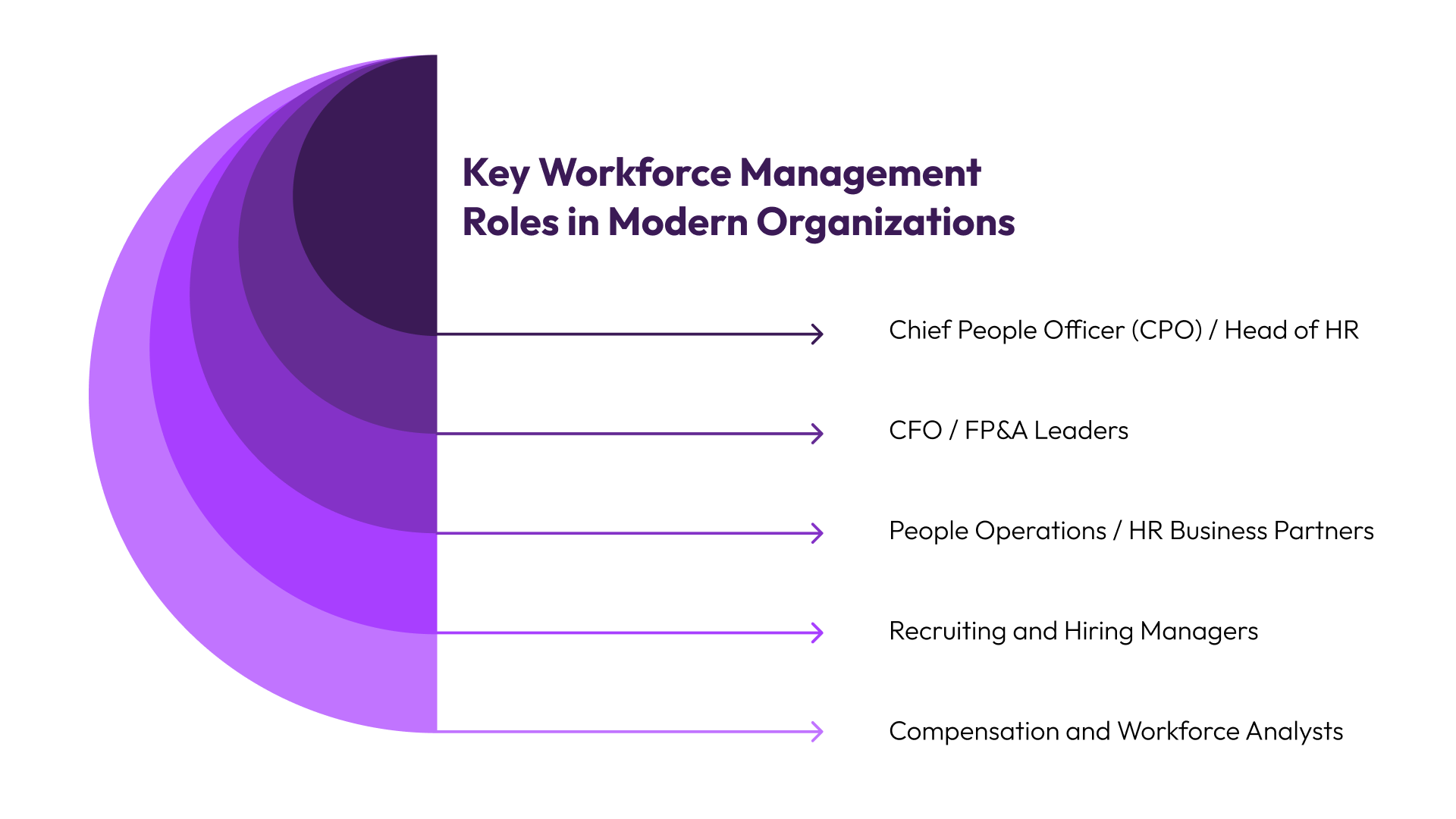
Workforce management involves multiple roles, each contributing to different aspects of planning, execution, and analysis. Understanding these roles is essential for building an effective workforce management strategy.
Below are the key roles involved and how they contribute to workforce management.
1. Chief People Officer (CPO) / Head of HR
The CPO or Head of HR sets the overall direction for workforce strategy. This includes defining how roles are structured, how compensation is managed, and how workforce planning supports business growth. Their decisions shape the foundation of workforce roles management.
Key responsibilities:
- Define job architecture, role levels, and organizational structure
- Set compensation philosophy and pay equity guidelines
- Align workforce planning with business growth objectives
- Review and approve major headcount decisions
- Identify gaps in workforce structure and optimize role distribution
- Partner with Finance to balance talent strategy with budget constraints
2. CFO / FP&A Leaders
CFOs and FP&A leaders focus on the financial impact of workforce decisions. They keep hiring plans and compensation structures aligned with budget expectations and financial goals. Their role is critical for maintaining cost visibility and control.
Key responsibilities:
- Forecast workforce costs and manage budget allocation
- Evaluate the financial impact of new roles and hiring plans
- Build and review headcount scenarios against revenue targets
- Track actual vs planned workforce spend
- Approve hiring based on budget thresholds
- Collaborate with HR to maintain cost discipline in compensation decisions
3. People Operations / HR Business Partners (HRBPs)
People Ops and HRBPs handle the day-to-day execution of workforce management processes. They ensure that compensation cycles, headcount requests, and workforce data are managed efficiently. Their role is central to operationalizing workforce roles management.
Key responsibilities:
- Manage compensation cycles, including raises and bonuses
- Coordinate headcount requests and approval workflows
- Maintain workforce data accuracy across systems
- Support managers with role definitions and compensation decisions
- Track workforce metrics such as attrition and promotions
- Act as a liaison between HR leadership, Finance, and business teams
4. Recruiting and Hiring Managers
Recruiting and hiring managers are responsible for filling roles and managing candidate offers. They rely on structured compensation frameworks and approval processes to make competitive and consistent offers. Their role directly impacts hiring speed and talent quality.
Key responsibilities:
- Create and manage candidate offers based on compensation benchmarks
- Align role requirements with defined job architecture
- Collaborate with HR and Finance for offer approvals
- Adjust hiring strategies based on workforce plans
- Balance candidate expectations with internal pay structures
- Track hiring progress against headcount plans
5. Compensation and Workforce Analysts
Analysts bring a data-driven approach to workforce management. They provide insights into compensation trends, headcount changes, and workforce performance. Their analysis supports better planning and more informed decision-making.
Key responsibilities:
- Analyze compensation data and pay distribution across roles
- Build workforce forecasts and headcount models
- Identify inefficiencies in workforce allocation
- Generate reports on workforce performance and cost trends
- Support scenario planning for hiring and budgeting
- Provide insights to improve compensation and planning strategies
Together, these roles form a system where decisions are shared across HR and Finance. This collaboration is essential for effective workforce roles management.
Core Workforce Management Strategies Organizations Use Today
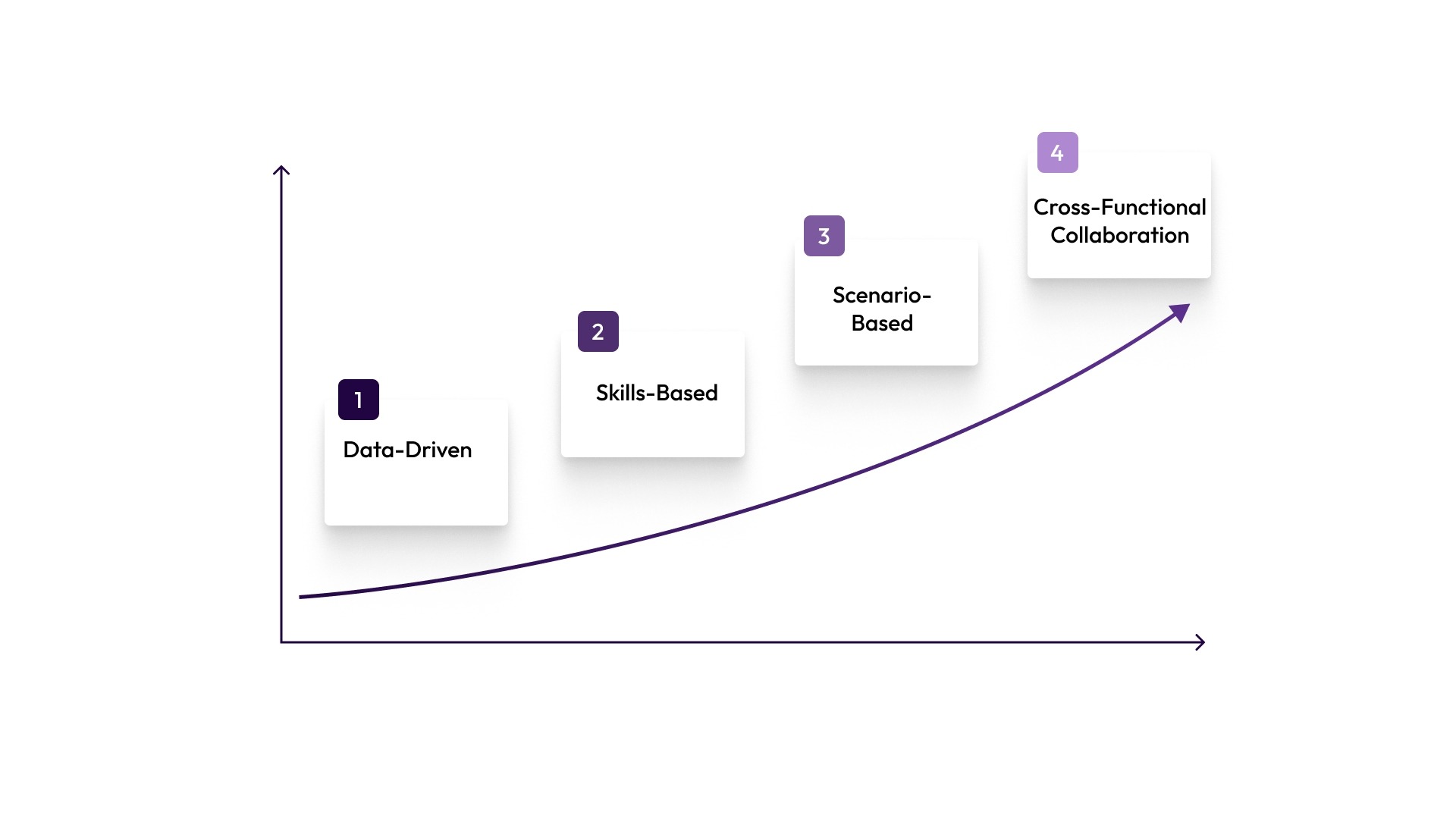
Organizations use a range of strategies to improve workforce roles management and align it with business goals. These strategies focus on improving visibility, consistency, and decision speed.
1. Data-Driven Workforce Planning
Data-driven workforce planning uses real-time insights to guide hiring, compensation, and role allocation decisions. Instead of relying on assumptions alone or outdated inputs, teams use workforce data to evaluate trends and forecast needs more accurately.
What this looks like in practice:
- Tracking headcount growth against budget in real time
- Analyzing compensation distribution across teams and roles
- Identifying gaps in workforce allocation before they impact performance
This approach helps teams move from reactive decisions to proactive planning. It also improves workforce roles management by connecting role-level decisions with measurable outcomes in day-to-day operations and planning cycles.
2. Skills-Based Role Planning
Skills-based role planning focuses on defining roles based on capabilities rather than just job titles. This allows organizations to adapt more quickly to changing business needs while maintaining clarity in compensation structures.
How teams apply this strategy:
- Mapping roles to required skills instead of fixed job descriptions
- Aligning compensation ranges with skill depth and market demand
- Adjusting hiring plans based on skill gaps rather than headcount alone
This method improves flexibility without losing structure. It also supports more accurate compensation planning by linking pay to skills and impact, not just role labels used internally across teams.
3. Scenario-Based Headcount Planning
Scenario-based planning allows teams to evaluate multiple hiring paths before committing to a decision. Each scenario reflects different growth assumptions, budget limits, and business priorities.
Common use cases include:
- Comparing aggressive vs conservative hiring plans
- Evaluating the cost impact of adding specific roles
- Understanding how hiring delays affect overall workforce capacity
By modeling different outcomes, teams gain better control over workforce costs. This makes workforce roles management more strategic, as every role is assessed within a broader financial context and budget planning structure.
4. Cross-Functional Collaboration
Effective workforce management depends on strong collaboration between HR and Finance. Without alignment, compensation decisions and hiring plans often move in different directions.
How organizations improve collaboration:
- Creating shared workflows for headcount approvals
- Using centralized data systems for compensation and workforce planning
- Aligning hiring decisions with budget ownership and accountability
This approach reduces delays and improves clarity across teams. It also helps organizations maintain consistency in workforce roles management by ensuring that all stakeholders operate from the same data and assumptions during planning and execution stages.
Also Read: 5 Proven Agile Workforce Management Strategies for Growing U.S. Teams (2026)
Software and Tools Used by Modern Workforce Management
Technology plays a central role in workforce management today. Teams rely on software to manage data, automate workflows, and improve decision-making.
- HRIS and payroll systems: Store employee records, job details, and compensation data in a central database, while supporting payroll execution. They are important for operations but offer limited support for forward-looking workforce planning.
- Applicant tracking systems (ATS): Manage hiring workflows, including job postings, candidate pipelines, and interview processes. They help standardize recruitment but do not connect hiring decisions to compensation or budget impact in most setups.
- Workforce planning and analytics tools: Provide forecasting capabilities for headcount, attrition, and workforce trends. They support data analysis but often operate separately from compensation workflows, which limits visibility across planning stages.
- Compensation management tools: Support pay band creation, salary benchmarking, and compensation review cycles. They improve consistency in pay decisions but may not fully integrate with hiring and headcount planning, creating gaps across planning workflows.
- Collaboration and workflow tools: Enable approvals, communication, and tracking across HR and Finance teams. They help coordination but often rely on manual inputs and do not maintain structured data connections across systems.
Common Challenges in Workforce Management
Despite advances in tools and strategies, many organizations still face challenges in workforce management. These challenges often come from disconnected processes and limited visibility across teams.
- Lack of Compensation Visibility: When compensation data is spread across systems, teams struggle to maintain consistency. This leads to inequitable pay decisions and confusion during hiring.
- Disconnected Headcount Planning: Headcount planning often happens separately from compensation planning. This disconnect creates gaps in understanding total workforce cost and planning accuracy.
- Slow Approval Workflows: Manual approval processes delay hiring and compensation decisions. This slows down operations and affects candidate experience.
- Inconsistent Role Benchmarking: Without standardized role definitions, benchmarking becomes unreliable. This leads to inconsistent compensation and hiring decisions.
How CandorIQ Can Help Transform Workforce Management
Managing workforce roles, compensation, and headcount planning manually often leads to inconsistent decisions and limited visibility.
CandorIQ helps teams bring these workflows together into a single system, improving clarity and alignment across HR and Finance.
- Compensation & Payband Builder: Define structured pay bands by role, level, and geography. This supports consistent compensation decisions and reduces reliance on spreadsheets.
- Compensation Cycle: Manage merit and bonus cycles with built-in workflows and approvals. Teams gain real-time visibility into budget impact and progress.
- Employee Total Rewards: Give employees clear visibility into salary, equity, and benefits. This supports transparency and reduces confusion during compensation discussions.
- Headcount Scenario Planning: Model hiring plans and evaluate cost impact before making decisions. This helps align headcount growth with budget constraints.
- Headcount Requests & Approvals: Streamline hiring approvals with structured workflows tied to budgets. This improves speed while maintaining control and accountability.
- Workforce Management: Track headcount, attrition, and role distribution in one place. This improves visibility into workforce trends and planning accuracy.
- Candidate Offers: Create consistent, data-backed offers using structured compensation frameworks. This helps recruiting teams move faster with better clarity.
- AI Agent: Analyze workforce data and model scenarios using natural language queries. This supports faster insights and more informed decisions.
By connecting compensation and headcount planning, CandorIQ helps teams move away from spreadsheets and toward more structured decision-making.
Contact us to get started.
FAQs
1. What KPIs should workforce managers track?
Workforce managers should track KPIs like employee utilization rate, absenteeism, turnover rate, schedule adherence, productivity per employee, and cost per hire. These metrics help evaluate efficiency, identify gaps, and improve workforce planning and operational performance.
2. What legal considerations apply to workforce scheduling?
U.S. teams should check FLSA overtime and recordkeeping rules, EEOC and Equal Pay Act obligations, and any state or local wage, scheduling, or pay-transparency rules that apply to their workforce. Because those rules vary by location, policy changes should be reviewed carefully before rollout.
3. What training is required for WFM specialists?
WFM specialists typically require training in workforce analytics, HR systems, labor law basics, scheduling tools, and data interpretation. Familiarity with ERP or WFM software and strong Excel or reporting skills are also essential for effective decision-making.
4. How can gamification enhance workforce strategies?
Gamification improves engagement by introducing rewards, leaderboards, and performance challenges. It motivates employees, boosts productivity, reduces absenteeism, and encourages healthy competition, ultimately improving retention and making workforce processes more interactive and performance-driven.
5. How does WFM integrate with ERP systems?
Workforce Management systems integrate with ERP platforms to unify HR, payroll, finance, and operations data. This enables real-time insights, automated scheduling, accurate payroll processing, and better workforce planning aligned with overall business resource management.
Ready to modernize your workforce and compensation strategy?
See how CandorIQ brings workforce planning and compensation together with AI.