

Workforce Planning Automation for U.S. Teams: 8 Ways to Control Headcount & Spend (2026)
Still managing headcount in spreadsheets? Discover 8 proven ways to use workforce planning automation to align hiring, compensation, and budgets, without manual approvals.

Are your workforce plans actually guiding hiring decisions, or just sitting disconnected from how teams operate day to day?
In 2026, nearly 42% of HR leaders are using agentic AI regularly to improve workforce planning and decision-making. This signals a clear shift toward more automated, data-driven planning. Yet, many still struggle to connect plans with execution.
The problem isn’t a lack of tools. It’s fragmented workflows, where headcount plans, hiring decisions, and compensation approvals live in separate systems and never truly align. This gap creates delays, budget overruns, and constant rework across growing teams.
This blog explores how workforce planning automation fixes that gap and turns planning into a system that actually works.
At a Glance
- Workforce planning automation connects planning, hiring, and compensation into one real-time system, replacing fragmented workflows that cause delays and budget misalignment.
- It shifts teams from static, annual plans to continuous planning, where headcount, hiring progress, and budgets stay aligned as decisions happen.
- Automation improves control and speed across critical workflows like approvals, compensation cycles, scenario planning, and reporting, without manual coordination.
- Most challenges come from disconnected systems and unclear workflows, not a lack of tools, making structured implementation essential for success.
- Platforms like CandorIQ bring everything together, helping teams align headcount, compensation, and budgets in one place while maintaining visibility and control at every step.
What Is Workforce Planning Automation?
Workforce planning automation is the process of connecting headcount planning, hiring decisions, compensation, and budgets into a single, real-time system.
It doesn’t just help you forecast. It ensures every decision follows a structured, controlled workflow.
What Workforce Planning Automation Actually Replaces
Most growing teams don’t struggle with planning itself. They struggle with how planning gets executed across disconnected systems.
Here’s what automation replaces in day-to-day workflows:
- Manual HRIS exports: Teams pull data into separate files just to understand the current headcount.
- Headcount reconciliation sheets: Different teams maintain different versions of the same plan, leading to constant mismatches.
- Email-based merit cycle approvals: Compensation decisions move through long email threads with no clear tracking or control.
- Disconnected ATS-to-budget handoffs: Hiring requests move forward without real-time visibility into approved budgets.
- One-time annual headcount submissions: Plans get locked early and quickly become outdated as business needs change.
These are not edge cases. They are the default way many teams still operate. Automation replaces these fragmented steps with a single workflow where planning, approvals, and execution stay aligned.

Workforce Planning Automation vs Workforce Management
Many teams confuse workforce planning automation with workforce management tools. They solve very different problems.
Here’s a clear breakdown:
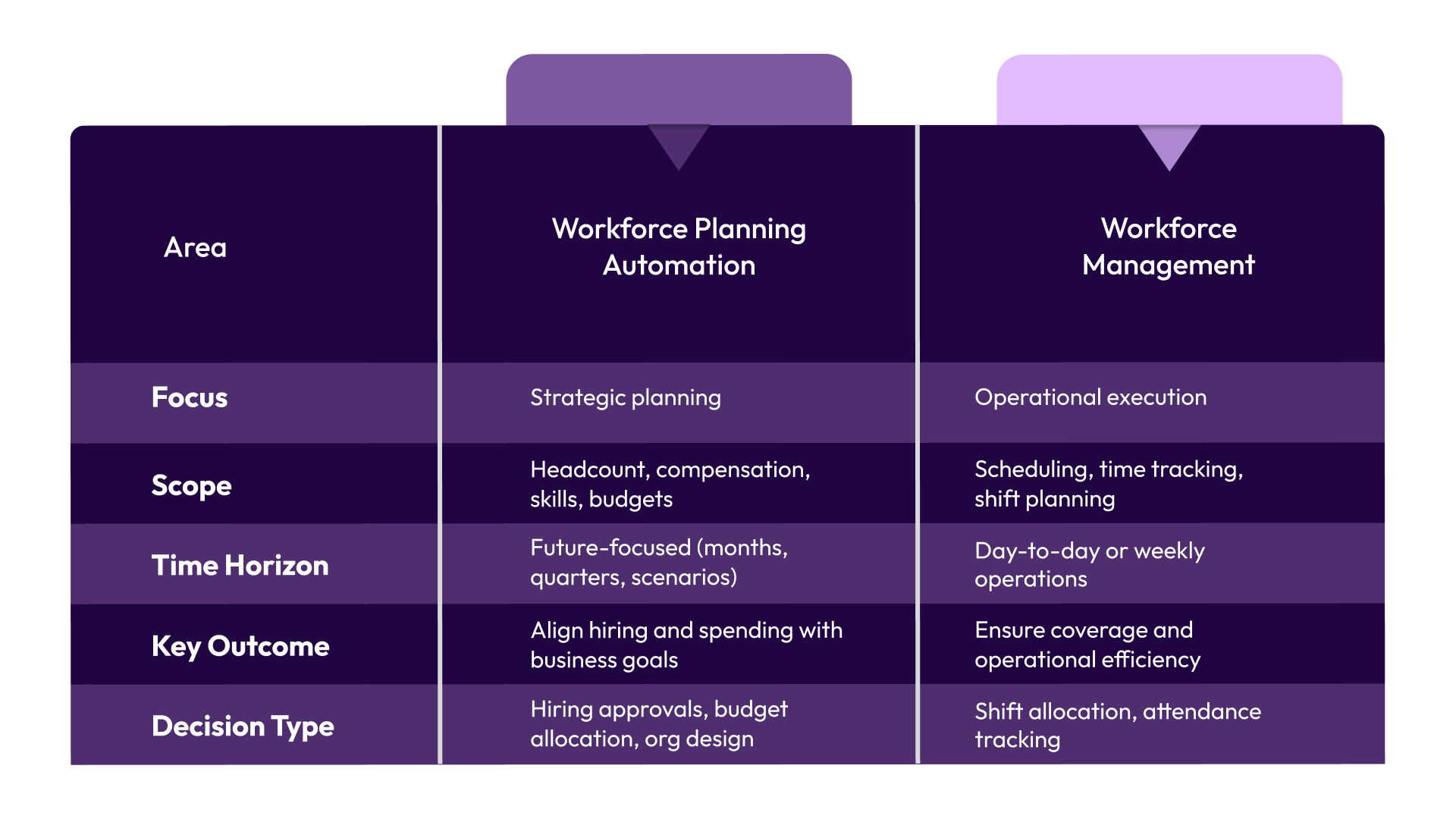
Confusing the two often leads to solving the wrong problem. Teams improve scheduling, but still struggle with hiring decisions and budget alignment.
Now that the definition and scope are clear, the next step is understanding where automation actually drives impact in strategic planning.
8 Ways to Improve Strategic Workforce Planning with Automation
Workforce planning doesn’t fail because of poor intent. It breaks when decisions happen across disconnected steps. Automation fixes this by turning those steps into one connected system.
Below are eight ways this shift shows up in real workflows:
1. Automate Headcount Reconciliation Across Systems
Headcount data often lives in multiple systems that don’t sync in real time. This creates constant mismatches. Automation creates a unified headcount view by syncing data across HR, hiring, and finance systems in real time.
What it solves:
- Conflicting headcount numbers across teams
- Time lost validating which data is correct
- Delays in decision-making due to uncertainty
Outcome: Teams operate from a single, trusted source of truth. Decisions happen faster because no one questions the numbers.
Platforms like CandorIQ bring this together by connecting headcount data directly with hiring and budget workflows, so reconciliation happens automatically instead of manually.
2. Replace Annual Planning Cycles with Continuous Workforce Intelligence
Traditional planning happens once or twice a year, but business needs change every month. Automation enables continuous planning by updating headcount, hiring progress, and budget data in real time.
What it solves:
- Plans becoming outdated quickly
- Reactive hiring decisions
- Lack of visibility into the current vs planned state
Outcome: Planning becomes dynamic. Teams adjust hiring and budgets as conditions change, instead of reacting too late.
Instead of revisiting plans every quarter, tools like CandorIQ allow teams to keep plans live, where every hiring decision updates the broader workforce picture instantly.
3. Embed Compensation Intelligence into Planning Workflows
Compensation decisions often happen after hiring plans are approved, creating misalignment. Automation integrates compensation data, such as pay ranges and budgets, directly into the planning and hiring workflow.
What it solves:
- Offers exceeding approved budgets
- Inconsistent pay decisions across teams
- Lack of visibility into compensation impact
Outcome: Every hiring decision is financially aligned from the start. This reduces rework and keeps spending under control.
Also Read: Benefits of Compensation Workflow Automation in HR
4. Run Multi-Scenario Headcount Models Instantly
Planning requires evaluating multiple possible futures, but manual modeling takes too long. Automation allows teams to create and compare multiple workforce scenarios instantly within the same system.
What it solves:
- Slow scenario planning processes
- Inability to react quickly to business changes
- Decisions based on incomplete analysis
Outcome: Teams can test different hiring and budget scenarios quickly, leading to better and more confident decisions.
With CandorIQ, compensation bands and budget guardrails sit inside the same workflow, so your teams don’t have to validate decisions after the fact.
5. Automate Skills Gap Identification
Hiring plans often focus on roles, not capabilities, which leads to misaligned growth. Automation analyzes current workforce data and compares it with future needs to identify missing skills.
What it solves:
- Hiring based on assumptions instead of data
- Over-investment in less critical roles
- Misalignment between the workforce and business goals
Outcome: Hiring becomes more targeted. Teams invest in the right capabilities instead of just increasing headcount.
6. Surface Retention Risk Within Workforce Plans
Attrition is often treated as a surprise rather than a planning factor. Automation incorporates retention signals into workforce planning, making potential attrition visible early.
What it solves:
- Sudden gaps in critical roles
- Reactive backfilling
- Disrupted team performance
Outcome: Teams plan for attrition before it happens. This reduces disruption and improves continuity in operations.
7. Streamline Merit Cycles and Promotion Planning
Compensation reviews often involve multiple stakeholders and unclear approval paths. Automation structures merit and promotion workflows with defined steps, approvals, and visibility.
What it solves:
- Delayed approvals
- Lack of transparency in decisions
- Inconsistent compensation updates
Outcome: Compensation cycles run smoothly and predictably. Teams complete reviews faster with full visibility into decisions.
8. Generate Board-Ready Workforce Reports Instantly
Workforce reporting often requires pulling data from multiple sources and formatting it manually. Automation consolidates workforce data into ready-to-use reports that reflect real-time information.
What it solves:
- Time-consuming data consolidation
- Risk of errors in reporting
- Inconsistent metrics across reports
Outcome: Teams generate accurate reports instantly. Leadership gets clear insights without delays or last-minute effort.
Each of these capabilities addresses a specific breakdown in how workforce planning operates today. Together, they create a system where planning, decisions, and execution stay aligned in real time.
Also Read: AI-Driven Workforce Optimization: Enhancing Management and Productivity
The next step is understanding how to implement this shift without adding complexity to existing workflows.
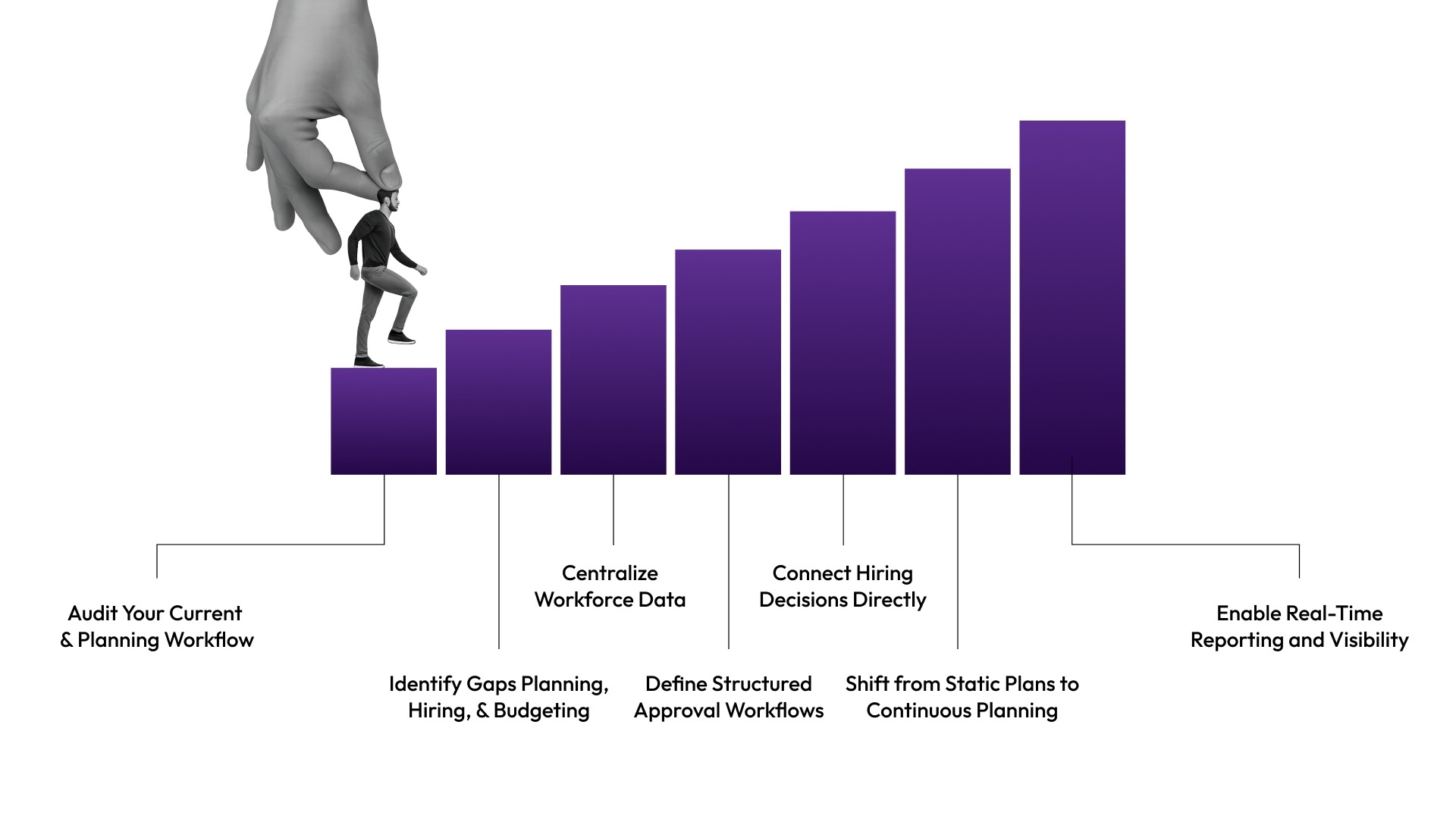
7 Steps to Implement Workforce Planning Automation
Understanding the benefits is one thing. Putting automation into practice is where most teams get stuck.
The challenge is not the lack of tools. It’s figuring out how to connect planning, hiring, and budget workflows without disrupting ongoing operations.
Here’s a practical step-by-step approach to make that shift work.
1. Audit Your Current Workforce Planning Workflow
Start by mapping how planning actually happens today, not how it’s supposed to happen.
What to look for:
- Where headcount data is stored
- How hiring requests are approved
- How compensation decisions are validated
- Where delays or rework happen
What this solves: It exposes hidden gaps between systems and teams that slow down decisions.
Outcome: You get a clear picture of where automation will create the most impact.
2. Identify Gaps Between Planning, Hiring, and Budgeting
Most breakdowns happen at the handoff points between systems.
Focus on questions like:
- Does hiring stay aligned with the approved headcount?
- Are compensation decisions checked against budgets in real time?
- Do approvals follow a consistent structure?
What this solves: It highlights where decisions move forward without proper checks.
Outcome: You can prioritize fixing the most critical disconnects first instead of trying to automate everything at once.
3. Centralize Workforce Data into a Single System
Automation only works when all decisions rely on the same data.
What this involves:
- Connecting HR, hiring, and finance data
- Creating one source of truth for headcount and budgets
- Ensuring data updates in real time
What this solves: It removes inconsistencies caused by multiple versions of the same data.
Outcome: Teams trust the data, which makes decisions faster and more reliable.
Platforms like CandorIQ are designed to bring these data points together, so teams don’t have to manually align information across systems.
4. Define Structured Approval Workflows
Unclear approval processes create delays and inconsistencies.
What to standardize:
- Who approves hiring requests
- How compensation decisions are reviewed
- What checks are required before approval
What this solves: It removes ambiguity and reduces back-and-forth communication.
Outcome: Approvals become faster, more consistent, and easier to track.
5. Connect Hiring Decisions Directly to Budget and Compensation
This is where most workforce planning systems fail today.
What this means:
- Every hiring request is tied to an approved role and budget
- Compensation decisions are validated before offers are finalized
- Changes update the overall plan instantly
What this solves: It prevents misalignment between planning and execution.
Outcome: Hiring stays within budget without slowing down decision-making.
Solutions like CandorIQ make this connection seamless by embedding budget and compensation checks directly into hiring workflows.
6. Shift from Static Plans to Continuous Planning
Once workflows are connected, the next step is to make planning dynamic.
What this involves:
- Updating plans as hiring progresses
- Adjusting budgets in real time
- Tracking actual vs planned headcount continuously
What this solves: It eliminates outdated plans that no longer reflect reality.
Outcome: Teams stay aligned with current business needs instead of reacting late.
7. Enable Real-Time Reporting and Visibility
Planning is only useful if it’s visible and easy to act on.
What to implement:
- Live dashboards for headcount and budget
- Instant reporting for leadership reviews
- Clear visibility into hiring progress
What this solves: It removes the need for last-minute data consolidation.
Outcome: Teams can make informed decisions quickly, without waiting for reports to be prepared.
Implementing workforce planning automation doesn’t require a complete overhaul overnight. It starts with fixing key disconnects and gradually building a connected system.
However, even with the right approach, workforce planning automation is not plug-and-play.
5 Challenges You Can Face in Workforce Planning Automation
Most issues don’t come from the technology itself. They come from how existing workflows are structured and how teams adapt to change.
Here are the most common challenges to watch for:
- Disconnected Data Across Systems: Workforce data often lives in separate tools, which leads to inconsistent headcount, hiring, and budget numbers.
- Unclear Ownership and Approvals: Without defined ownership, hiring and compensation decisions get delayed due to unclear approval responsibilities.
- Resistance to Process Change: Teams often stick to familiar manual workflows, which slows the adoption of new automated systems.
- Lack of Real-Time Budget Visibility: Hiring decisions move forward without clear visibility into budget impact, leading to misalignment.
- Static Planning Mindset: Teams continue treating workforce plans as fixed documents instead of updating them continuously.
- Planning and Hiring Not Connected: Hiring workflows often operate separately from planning, creating gaps between approved plans and actual execution.
These challenges are common, but they are also fixable with the right structure and approach. A connected system brings all these pieces together in a practical way.
Also Read: How to Excel in Talent and Workforce Planning?
How a Connected System Brings Workforce Planning Together
Most workforce planning challenges come from one core issue: planning, hiring, and compensation run in separate workflows. Data doesn’t sync in real time, approvals lack structure, and decisions move forward without full visibility. The result is delays, misalignment, and constant rework across growing teams.

CandorIQ solves this by bringing headcount planning, compensation, and hiring workflows into one connected system. Instead of managing separate tools, teams can plan, approve, and execute decisions in a single place with real-time visibility and built-in controls.
Here’s how we make this work:
- Compensation & Payband Builder: Define structured pay bands by role, level, and location with real-time visibility into pay distribution and historical changes.
- Compensation Cycle Management: Run merit and bonus cycles with built-in approval workflows, budget tracking, and clear visibility into every decision.
- Candidate Offer Management: Create and manage offers with full compensation breakdowns, ensuring clarity and consistency across hiring decisions.
- Headcount Scenario Planning: Model different hiring plans and instantly see their impact on budgets, org structure, and future growth.
- Headcount Requests & Approvals: Standardize hiring requests with structured workflows, dynamic approvals, and direct alignment with budgets.
- Workforce Visibility & Tracking: Track headcount, attrition, promotions, and hiring progress in one unified view.
- AI-Powered Insights: Analyze workforce data, forecast needs, and get recommendations without manual data digging.
When these capabilities work together, workforce planning shifts from a fragmented process to a system where every decision stays aligned from plan to execution.
Conclusion
Workforce planning no longer fails because of poor strategy. It fails when plans stay disconnected from how hiring and compensation decisions actually happen.
Automation changes that. It connects planning, approvals, and execution into one system where every decision is aligned in real time. This reduces delays, improves visibility, and keeps teams in control as they grow.
If your current process still relies on fragmented workflows and manual coordination, the gap will only widen as your team scales.
Book a demo with CandorIQ to see how you can bring headcount planning, compensation, and hiring into one connected system, without the usual complexity.
.png)
FAQs
1. Can workforce planning automation work without replacing existing tools?
Yes. Most modern solutions integrate with existing HR, hiring, and finance systems. The goal is not replacement, but connection, so data flows seamlessly across tools without requiring teams to change their entire tech stack.
2. How does automation handle mid-cycle hiring changes?
Automation updates plans in real time as hiring decisions change. This ensures headcount, budgets, and approvals stay aligned without requiring manual adjustments or waiting for the next planning cycle.
3. What kind of data is required to get started?
At a minimum, you need current headcount data, open roles, compensation ranges, and budget allocations. As the system evolves, it can incorporate more data, such as attrition trends and performance inputs, to provide deeper planning insights.
4. How does workforce planning automation improve approval speed?
It replaces back-and-forth communication with structured workflows. Approvals follow predefined rules, which reduces delays, increases accountability, and ensures every decision is tracked and aligned with budgets and planning guidelines.
5. Is workforce planning automation only useful for large enterprises?
No. It is especially valuable for growing teams where planning complexity increases quickly. Automation helps maintain control and alignment early, preventing operational issues that typically appear as teams scale.
Ready to modernize your workforce and compensation strategy?
See how CandorIQ brings workforce planning and compensation together with AI.