

5 Proven Ways to Manage Headcount Request Notifications in 2026
Explore how headcount request notifications improve hiring speed with automation, approval dashboards, and real-time visibility.

Why does your hiring take so long, even when the right candidate is ready?
In 2025, the average time to hire in the United States reached 63.5 days, a sharp increase from previous years. At the same time, 94% of companies report hiring bottlenecks with decisions taking longer than they did just two years ago.
The problem isn’t always finding talent. It’s what happens after. Headcount requests get stuck in emails, missed notifications, and unclear ownership across HR and Finance teams.
This blog explores how to manage headcount request notifications using automation, alerts, and dashboards, so you can speed up hiring without losing budget control.
At a Glance
- Headcount request notifications are essential for faster hiring. They ensure every request is seen, reviewed, and approved on time—reducing delays caused by missed updates or manual follow-ups.
- Hiring slows down due to fragmented approval processes. Emails, Slack messages, and unclear ownership create bottlenecks across HR and Finance teams.
- Effective systems combine notifications, alerts, and workflows. Notifications inform, alerts drive action, and workflows ensure every headcount request follows a structured approval path.
- Automation and dashboards bring speed and visibility. Headcount approval automation removes manual delays, while a headcount approval dashboard shows real-time status, ownership, and budget impact.
- CandorIQ unifies headcount request notifications, approvals, and planning. It connects HR and Finance in one system, helping teams align hiring decisions with budgets and scale without process breakdowns.

What Are Headcount Request Notifications in HR?
Headcount request notifications are automated alerts that trigger when a hiring request is created, updated, or needs approval within an HR workflow.
These notifications ensure the right people review, approve, or act on hiring decisions at the right time.
Where Notifications Fit in the Hiring Workflow
.jpg)
Headcount notifications are not a standalone feature. They sit inside your entire hiring and approval process.
Here’s where they show up:
- Request creation: A hiring manager submits a new headcount request. Notifications go to HR and finance for review
- Approval routing: Requests move across stakeholders. Each stage triggers alerts for the next approver.
- Budget validation: Finance checks the cost against the planned budget. Alerts trigger if thresholds are exceeded.
- Offer approval: Final notifications ensure compensation aligns before rollout.
Without these triggers, approvals slow down or get lost completely.
Why Headcount Request Notifications Matter for U.S. Organizations
In US-based companies, hiring decisions carry more weight than just filling roles. They directly impact cost, compliance, and growth plans.
Here’s why notifications matter:
- Budget control: Finance teams need visibility before approving new roles.
- Compliance and audit readiness: Every hiring decision must be documented and traceable.
- Faster hiring cycles: Timely alerts reduce approval delays and candidate drop-offs.
When notifications work well, hiring becomes predictable. When they fail, everything slows down.
Now that you understand what headcount notifications are and where they fit, let’s look at why most systems still break as companies scale.
Why Traditional Headcount Request Approval Processes Break
Most systems fail not because of tools, but because of how teams manage approvals. As companies grow, small gaps turn into major delays.
1. Email and Slack Fragmentation
Most headcount requests still move through emails or Slack threads. That creates scattered conversations with no single source of truth.
Here’s what happens:
- Requests get buried in inboxes
- Approvers miss important messages
- Teams follow up manually again and again
As a result, hiring slows down before it even starts.
2. Lack of Ownership Across Stakeholders
A headcount request usually involves multiple people. Hiring managers, HRBPs, and finance teams all play a role.
But without clear ownership:
- No one knows who should approve next
- Requests sit idle for days
- Teams assume someone else is handling it
This confusion creates silent delays that no dashboard can easily track.
3. Delayed Cross-Functional Approvals
Approvals don’t just stay within HR. Finance must validate budgets, and leadership may need final sign-off.
When systems don’t connect these teams:
- Requests move back and forth manually
- Finance reviews happen late in the process
- Hiring decisions stall at critical stages
This delay often costs you, strong candidates.
4. Hiring Decisions Disconnected from Budget
This is where the biggest risk shows up. Many approvals happen without real-time budget visibility.
That leads to:
- Over-hiring beyond planned budgets
- Last-minute rejections from finance
- Misalignment between hiring plans and financial goals
By the time issues surface, teams have already lost time and momentum.
Traditional processes break because they rely on manual coordination instead of structured systems. So before fixing notifications, you need to understand how they connect to alerts and workflows.
Also Read: A Practical Guide to Headcount Forecasting for High-Growth Teams
Notifications vs. Alerts vs. Headcount Approval Workflows
Before you improve your system, you need to get the basics right. Many teams use “notifications,” “alerts,” and “workflows” interchangeably, but they are not the same.
This confusion often leads to broken processes and missed approvals.
How They Work Together
These three elements depend on each other to keep hiring moving.
- Workflows define the process.
- Automation moves requests through that process.
- Alerts and notifications keep people informed and accountable.
If one piece is missing:
- You get too many alerts with no structure
- Or structured workflows with no visibility
- Or updates that don’t drive action
Why This Matters for Growing Teams
As your company scales, complexity increases. More roles, more approvals, and more stakeholders slow everything down.
Without a clear system:
- Requests get stuck between teams.
- Approvals take longer than expected.
- Hiring decisions are no longer aligned with the budget.
A structured approach ensures that every request moves forward with clarity and speed.
Now that the foundation is clear, let’s move to the most important part, the key alerts you must set up to keep headcount approvals moving without delays.
The 5 Critical Headcount Request Notifications You Must Configure
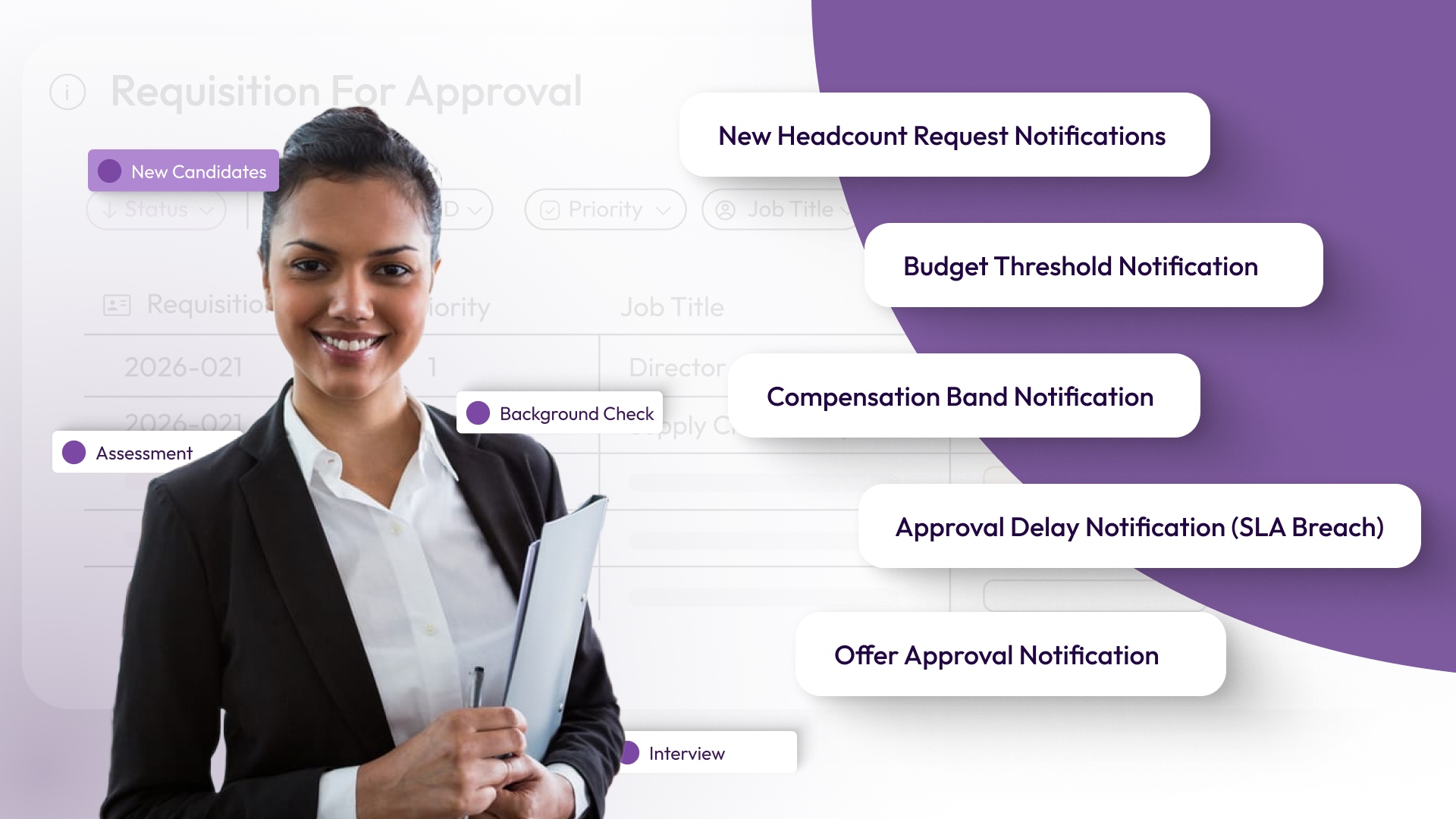
Most teams either set too many alerts or the wrong ones. That creates noise instead of clarity. People start ignoring notifications, and the system breaks again. The goal is not to track everything. The goal is to highlight the exact moments where decisions are required.
These five alerts do exactly that.
1. New Headcount Request Notifications
Every hiring process starts with a request. But in many companies, this is where delays quietly begin. A hiring manager submits a request, but nothing happens for hours, or even days, because no one notices it immediately.
What this alert does: It instantly notifies the right stakeholders the moment a request is created.
Why this matters in practice:
- HR can review the role before it moves forward
- Finance gets early visibility into upcoming costs
- The approval process starts without manual follow-ups
Tools like CandorIQ can automatically route these alerts to the right stakeholders without manual tagging
Without this notification, the system depends on someone “checking” requests manually. That rarely happens on time.
2. Budget Threshold Notification
In many companies, budget checks happen too late. A role moves through approvals, interviews begin, and only then does finance flag a problem. By that point, time and effort are already lost.
What this alert does: It flags requests the moment the proposed cost exceeds the approved budget or plan.
Why this matters in practice:
- Finance can step in early, not at the last minute
- Hiring managers understand constraints upfront
- Teams avoid rework caused by rejected requests
Platforms like CandorIQ can tie alerts directly to real-time budget data, reducing approval back-and-forth. This alert shifts budget control from reactive to proactive.
3. Compensation Band Notification
Compensation issues often surface at the worst possible moment, right before the offer goes out. A candidate is selected, expectations are set, and then someone realizes the salary is outside the approved range. This leads to delays, renegotiations, or even losing the candidate.
What this alert does: It triggers when the proposed salary falls outside predefined pay bands.
Why this matters in practice:
- Ensures consistency across roles and teams
- Protects internal pay equity
- Avoids last-minute offer changes
It also helps compensation teams stay involved at the right stage, instead of stepping in too late.
4. Approval Delay Notification (SLA Breach)
Most hiring delays are not caused by a lack of candidates. They are caused by slow approvals. The problem is not always visible. A request might sit with one approver, and no one realizes it’s stuck.
What this alert does: It tracks how long a request stays at each stage and triggers an alert if it exceeds a defined timeframe.
Why this matters in practice:
- Approvers get reminded before delays become critical
- Managers can step in when needed
- Teams maintain consistent approval timelines
This alert introduces accountability into the process. Everyone knows delays will be visible.
5. Offer Approval Notification
The final step in hiring is also the most sensitive. This is where budget, compensation, and business urgency all come together. Without a structured checkpoint, teams risk moving too fast or missing critical validations.
What this alert does: It triggers when a candidate is selected, and the offer is ready for approval.
Why this matters in practice:
- Confirms that budget and compensation are aligned
- Ensures all stakeholders sign off before the offer goes out
- Reduces the risk of offer withdrawals or delays
This alert acts as a final safeguard before committing to a hire.
Each of these alerts focuses on a specific moment in the hiring process. But their real value comes from how they work together. They create a system where every request is seen immediately, every cost is validated early, every delay is visible, and every offer is aligned.
Now that you know which headcount request notifications to set up, the next step is making them work automatically. Without automation, notifications still depend on manual actions. That leads to delays, missed updates, and constant follow-ups.
How Headcount Approval Automation Works (Step-by-Step)
Headcount approval automation ensures that every headcount request notification is triggered, routed, and acted on without manual effort. Here’s how it works in practice.
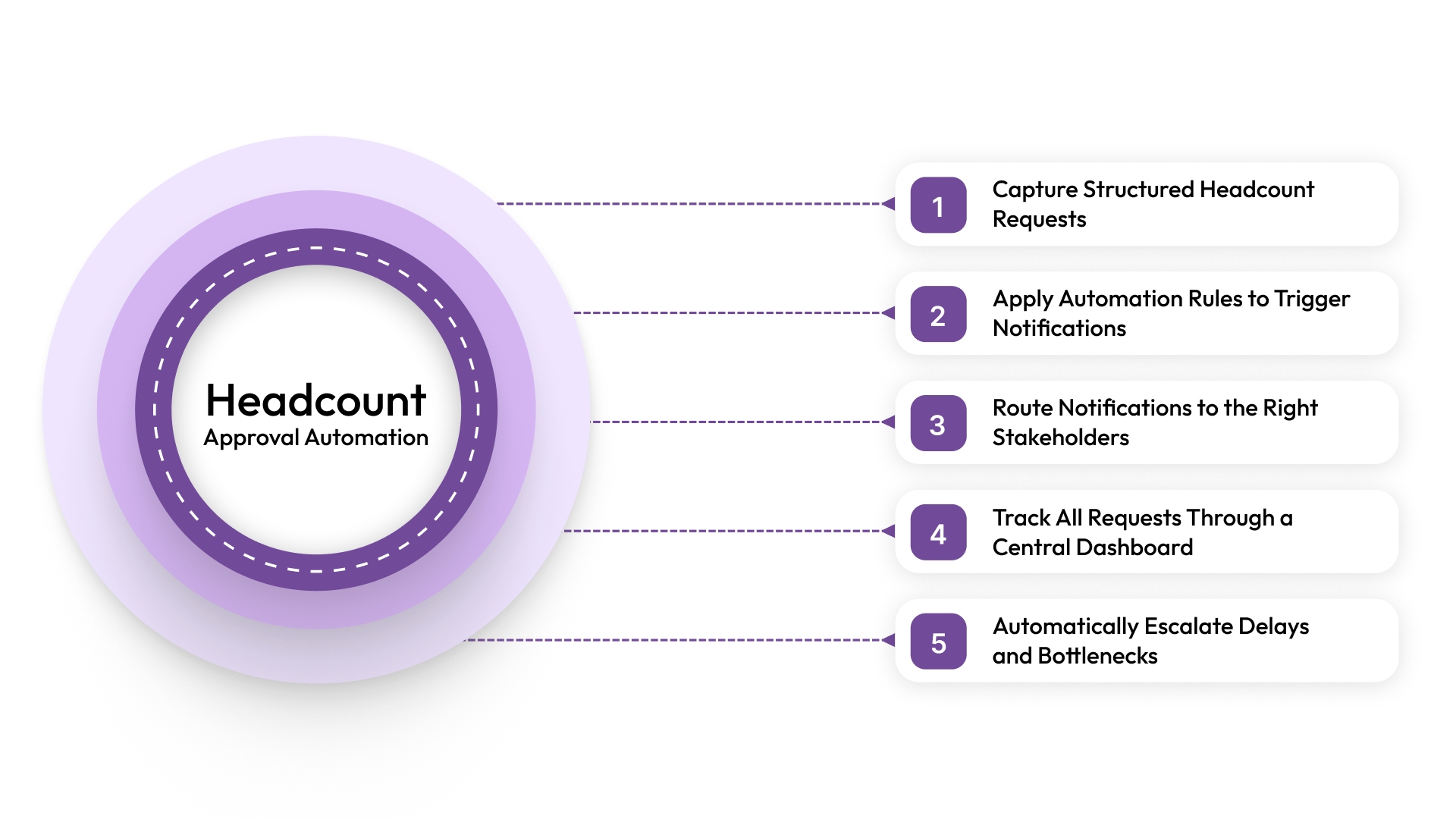
Step 1: Capture Structured Headcount Requests
Every workflow starts with clean and consistent data. If the request details are incomplete, notifications become unreliable.
What happens at this stage:
- Hiring managers submit structured requests.
- Required fields include role, department, salary range, and justification.
- Budget and compensation inputs are clearly defined.
Why this matters:
- Accurate data ensures relevant headcount request notifications.
- Prevents back-and-forth due to missing information.
Strong inputs lead to meaningful notifications downstream.
Step 2: Apply Automation Rules to Trigger Notifications
Once the request is submitted, automation rules decide what happens next. This is where headcount request notifications become intelligent.
What happens at this stage:
- Rules evaluate budget, role type, and department.
- Conditions determine which headcount request notifications should trigger.
- Notifications are tailored to specific scenarios.
Why this matters:
- Eliminates guesswork in decision-making.
- Ensures the right alerts trigger at the right time.
This step turns static notifications into dynamic decision signals.
Step 3: Route Notifications to the Right Stakeholders
Notifications only work if they reach the right people. Automation ensures proper routing without manual tagging or follow-ups.
What happens at this stage:
- Headcount request notifications are sent to HR, finance, or leadership based on rules.
- Each stakeholder receives only relevant alerts.
- No manual forwarding is required.
Tools like CandorIQ can automatically route notifications across HR and finance workflows.
Why this matters:
- Reduces confusion about ownership.
- Prevents delays caused by missed approvals.
The right notification to the right person keeps the process moving.
Step 4: Track All Requests Through a Central Dashboard
As notifications move across the workflow, visibility becomes critical. Teams need to see what’s happening in real time.
What happens at this stage:
- Every headcount request is tracked in a central system.
- Teams can view status, pending approvals, and delays.
- Notifications and actions are logged in one place.
Why this matters:
- Eliminates the need for manual status checks.
- Helps identify bottlenecks instantly.
Platforms like CandorIQ connect headcount request notifications with dashboard visibility for full control.
Visibility turns notifications into actionable insights.
Step 5: Automatically Escalate Delays and Bottlenecks
Even with automation, delays can happen. The difference is that they don’t go unnoticed now.
What happens at this stage:
- If approvals exceed the defined timelines, escalation notifications are triggered.
- Alerts are sent to managers or secondary approvers.
- The system ensures no request stays stuck.
Why this matters:
- Keeps workflows moving without manual intervention
- Builds accountability across teams
Escalation ensures that no headcount request notification gets ignored.
So, headcount approval automation connects every step of the hiring process through structured notifications.
Also Read: A Comprehensive Guide to AI for HR Automation and Solutions
Now that you understand how automation powers headcount request notifications, the next step is improving how these notifications are delivered, so teams stay informed without feeling overwhelmed.
How a Headcount Approval Dashboard Improves Visibility
Once your headcount request notifications are automated, the next challenge is visibility. Notifications tell you something happened, but they don’t always show the full picture.
A headcount approval dashboard solves this by bringing all headcount request notifications, approvals, and decisions into one place. Instead of chasing updates, teams can see exactly what is happening in real time.
Here’s how it improves visibility across your hiring process:
1. Real-Time Status of Every Headcount Request
A headcount approval dashboard shows the live status of every request. You don’t have to rely on scattered headcount request notifications to understand progress.
You can quickly see which requests are pending, approved, or stuck at a specific stage. This clarity helps teams act faster without waiting for updates.
2. Clear Ownership Across Stakeholders
Headcount request notifications often reach multiple people, but they don’t always define ownership clearly. This creates confusion and slows decisions.
A dashboard solves this by showing exactly who is responsible at each stage. You can see who approved previous steps and who needs to act next.
3. Instant Identification of Bottlenecks
Notifications can highlight delays, but they don’t always show patterns. A dashboard gives you a broader view of where things slow down.
You can identify which approval stages take the longest and where requests consistently get stuck. This helps you fix process issues, not just individual delays.
4. Visibility into Budget and Hiring Impact
Hiring decisions directly affect your budget, but headcount request notifications alone don’t provide a full financial context.
A dashboard connects each request with its cost impact, helping teams see how hiring decisions align with budget plans. Platforms like CandorIQ make this even clearer by combining compensation and budget data in one place.
5. Centralized View of Notifications and Actions
Managing headcount request notifications across emails, Slack, and tools creates confusion. Important updates get lost, and teams waste time searching for information.
A headcount approval dashboard brings all notifications, approval history, and actions into a single view. This creates a reliable source of truth for everyone involved.
A headcount approval dashboard does more than display information. It connects your headcount request notifications with real-time insights and decision-making.
Even with automated workflows and dashboards, many teams still struggle with disconnected systems. This is where CandorIQ comes in.
Why Teams Move to CandorIQ for Headcount Request Notifications and Approvals
.jpg)
Workflow fragmentation creates delays, misalignment, and constant back-and-forth between HR and Finance. As hiring scales, these gaps only become harder to manage.
CandorIQ solves this by bringing headcount request notifications, approvals, compensation, and planning into one unified system. It connects every step of the hiring workflow, so notifications don’t just inform teams, they drive aligned decisions.
This is what we enable:
- Centralized Headcount Requests & Approvals: Create structured requests with built-in budgets and trigger real-time headcount request notifications across stakeholders.
- Dynamic Approval Workflows: Automatically route approvals based on role, department, or compensation thresholds to reduce delays.
- Real-Time Budget Visibility: Connect headcount request notifications directly to budget data, so Finance and HR stay aligned at every step.
- Compensation & Pay Band Integration: Ensure every request aligns with approved salary ranges and internal equity guidelines.
- Headcount Scenario Planning: Model hiring plans and instantly see how new requests impact budgets and team structure.
- Unified Dashboard for Full Visibility: Track every request, notification, and approval status in one place without switching tools.
- Automated Alerts & Notifications: Send the right headcount request notifications at the right time through Slack or email integrations.
- AI-Powered Insights: Analyze hiring trends, identify gaps, and forecast workforce needs with built-in intelligence.
CandorIQ turns scattered headcount request notifications into a structured, scalable system that supports faster and more confident hiring decisions.
Conclusion
Managing headcount request notifications directly impacts hiring speed, budget control, and team alignment. When notifications, approvals, and visibility work together, your hiring process becomes faster, clearer, and more predictable.
If your team is still relying on emails, spreadsheets, or disconnected tools, it may be time to rethink your approach. CandorIQ helps you bring headcount request notifications, approvals, and planning into one unified workflow, so every hiring decision is aligned, efficient, and scalable.
Book a demo to see how it works in practice.

FAQs
What is the difference between headcount request notifications and alerts?
Headcount request notifications include all updates related to a hiring request, while alerts are specific notifications triggered by conditions like delays or budget limits. In short, alerts are a subset of notifications focused on exceptions or actions.
How can companies automate headcount request notifications?
Companies can automate headcount request notifications by using workflow tools that trigger updates based on predefined rules. These systems notify stakeholders instantly, route approvals automatically, and escalate delays without manual intervention.
What should a headcount approval dashboard include?
A headcount approval dashboard should show real-time request status, approval stages, ownership, and budget impact. It should also include notification history so teams can track actions and identify delays quickly.
How do headcount request notifications improve hiring speed?
Headcount request notifications improve hiring speed by ensuring approvals happen without delays. They notify stakeholders instantly, reduce manual follow-ups, and trigger escalations when requests remain pending too long.
What are common challenges with headcount request notifications?
Common challenges include too many notifications, unclear ownership, lack of budget visibility, and disconnected systems. These issues often lead to missed updates and slower approval cycles.
How does automation improve headcount approval workflows?
Automation improves headcount approval workflows by triggering notifications, routing approvals, and tracking progress automatically. This reduces manual effort, increases accountability, and ensures a consistent and faster hiring process.
Ready to modernize your workforce and compensation strategy?
See how CandorIQ brings workforce planning and compensation together with AI.