

Workforce Planning Analytics: Metrics, Tools, and Framework (2026)
Workforce planning analytics connects hiring plans, headcount data, and workforce costs. Learn the metrics, tools, and framework modern teams use to plan ahead.

Your headcount plan looks clean in January. By April, three roles are backfilled, two are frozen, and Finance is questioning why the people budget is tracking 18% over plan.
Nobody made a bad decision. The data just never kept up.
This is the gap that workforce planning analytics is built to close. It connects headcount decisions to real business data so HR and Finance can stop reconciling numbers after the fact and start making faster, more confident calls together.
And the stakes are real. U.S. labor data consistently show that wages and salaries account for roughly 70.5% of total employer compensation costs in private industry, with the rest allocated to related expenses. Workforce decisions are among the largest financial decisions a company makes. Getting them right requires more than intuition.
This guide walks through what workforce planning analytics is, why it matters, which metrics to track, how to build a framework, and how to put it into practice.
In a Nutshell
- Workforce planning analytics helps forecast hiring needs, headcount growth, and workforce costs before decisions impact budgets.
- Tracking metrics like headcount variance, time to hire, and attrition reveals where workforce plans may break down.
- Predictive workforce insights enable HR and Finance to anticipate talent gaps rather than react to them.
- Tools like CandorIQ, Visier, and Anaplan support workforce planning analytics across planning, analytics, and financial modeling.
- Companies using workforce planning analytics make faster hiring decisions while keeping workforce costs aligned with business growth.
What Is Workforce Planning Analytics?
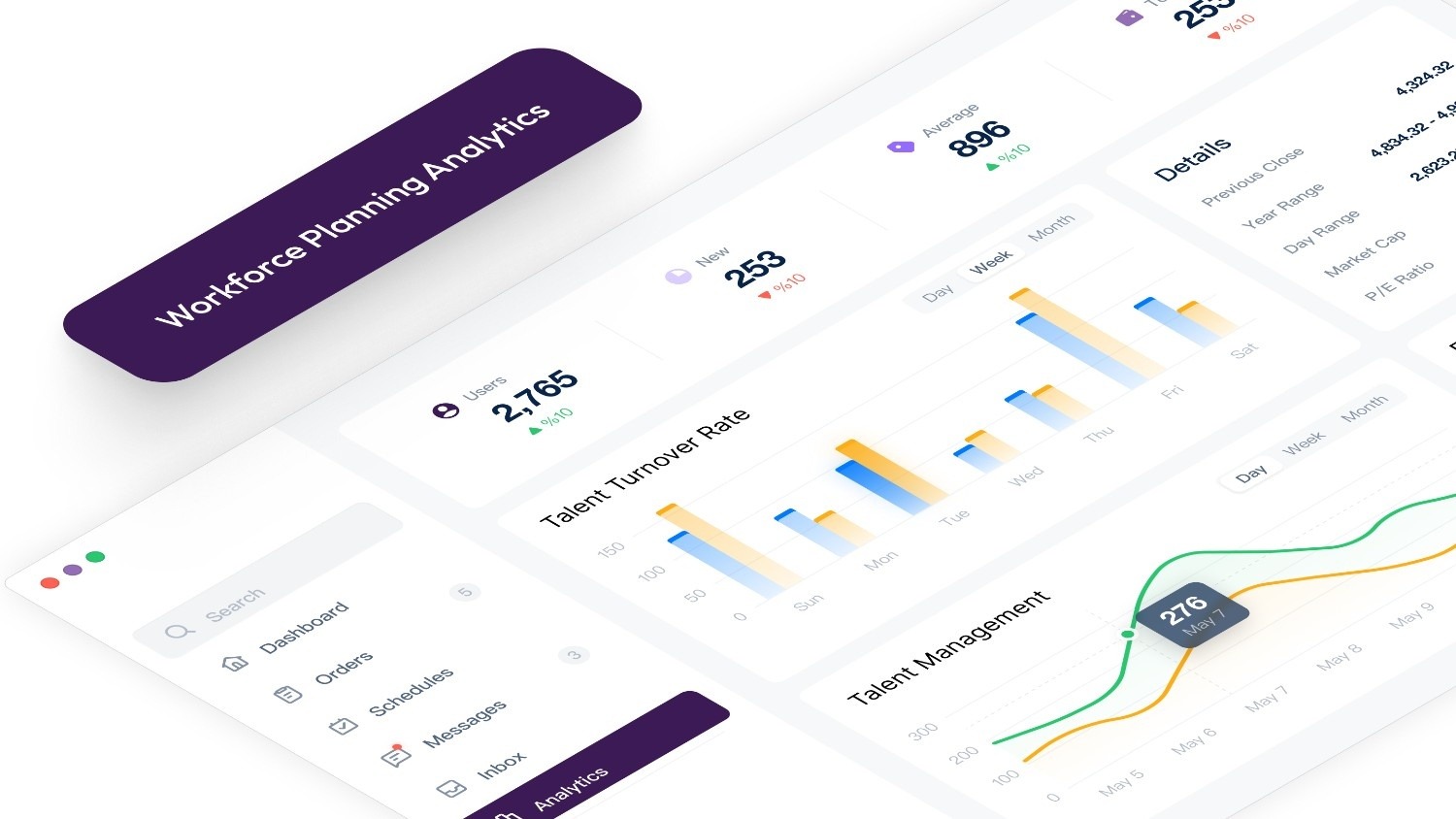
Workforce planning analytics is the practice of using workforce data to forecast, manage, and optimize your people decisions. It combines headcount numbers, compensation costs, attrition trends, and hiring timelines into a connected view that helps HR and Finance plan with clarity.
It is not about building bigger dashboards. It is about answering the questions that actually move business decisions forward.
There are three layers to it:
- Descriptive analytics tells you what is happening right now: headcount by department, open roles, attrition rate, and compensation spend.
- Predictive analytics tells you what is likely to happen next: projected turnover, hiring demand, and budget impact by quarter.
- Prescriptive analytics tells you what to do about it, when to start a search, which role to prioritize, and where a hiring freeze would protect runway.
Most teams stop at descriptive. The competitive edge lies in the other two.
Why Workforce Planning Analytics Matters for Growing Companies?
Growth-stage companies make more workforce decisions per quarter than most large enterprises make in a year. New roles, backfills, promotions, budget revisions, org restructures. The volume is high, and the cost of a misstep compounds fast.
A senior mis-hire can cost upward of $50,000 when you factor in recruiting fees, onboarding time, and lost productivity. A delayed hire in a revenue-generating role can push a product launch or a sales target by an entire quarter.
Workforce planning analytics matters because it replaces reactive scrambling with structured, evidence-backed decisions.
Here is what that shift looks like in practice:
- Budget protection: Finance sees the full cost impact of a hire before approval, not when it hits the books.
- Faster recruiting: When teams know which roles are coming 60 to 90 days out, pipelines are built before urgency hits.
- Retention signals: Attrition patterns, tracked over time, reveal which teams are at risk before anyone hands in a notice.
- Aligned decisions: HR and Finance stop debating which version of the headcount plan is right because they are both working from the same data.
The shift is from reactive to proactive. And for companies scaling fast, that shift is the difference between hiring that supports growth and hiring that chases it.
How Workforce Planning Analytics Improves Hiring, Budgeting, and Workforce Strategy?
Once you understand why it matters, it helps to see how it actually changes the way teams work day-to-day. The impact shows up in three areas.
Smarter, Faster Hiring
When your data shows that senior engineering roles take an average of 75 days to fill and 60 days to reach full productivity, you can schedule searches four months before the role is needed. That is not a luxury. For revenue-critical roles, it is the only way to avoid execution gaps.
Workforce planning analytics makes that timing math visible. Without it, recruiting is always playing catch-up.
More Accurate Budgeting
Most headcount budget overruns are not caused by bad decisions. They are caused by incomplete models. Teams budget for base salary but forget to account for benefits, signing bonuses, recruiter fees, onboarding costs, and equity refreshers.
When every approved role carries a full cost model, Finance can project actual spend, not just salary ranges. CFOs stop being surprised at quarter-end. And headcount approvals become a real conversation between HR and Finance, not a rubber stamp that comes back as a problem three months later.
Stronger Workforce Strategy for HR Leaders
This is the shift that matters most for CPOs and People leaders.
When attrition data, compensation benchmarks, and headcount trends are connected, HR is no longer reporting on what happened. It is informing what comes next. That earns a different kind of seat at the table.
Succession gaps become visible before they become emergencies. Teams at risk of pay compression are flagged before they begin to lose people. And every workforce recommendation comes with a financial model.
That is what workforce planning analytics makes possible.
Key Workforce Planning Metrics Companies Should Track
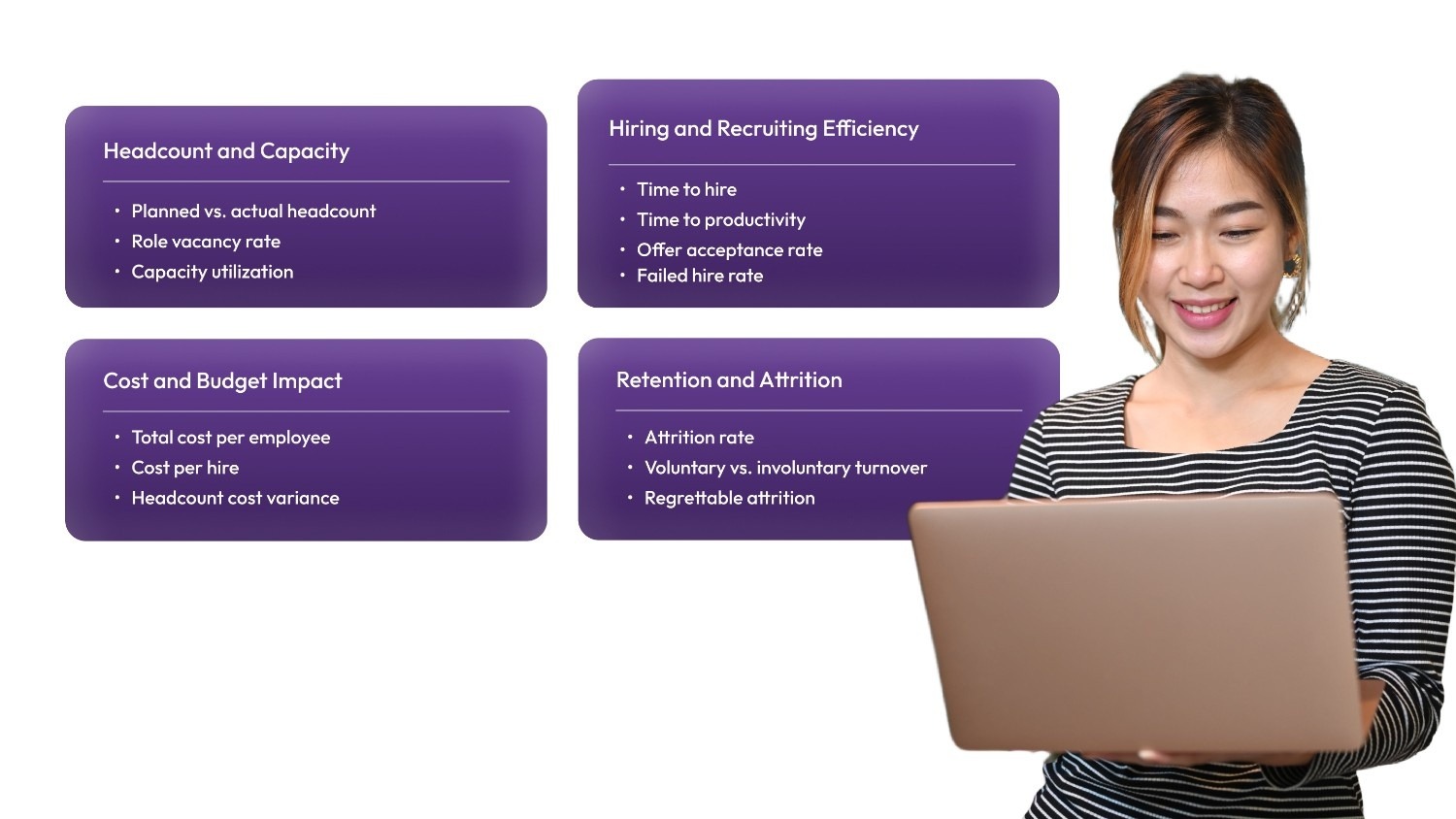
Tracking the right metrics is what separates an actionable analytics practice from a dashboard no one uses. Here are the most important ones for scaling teams, grouped by what they reveal.
Headcount and Capacity
- Planned vs. actual headcount: The gap between approved roles and filled roles by period. A widening gap signals an execution problem worth investigating.
- Role vacancy rate: Open positions as a percentage of total approved headcount. High vacancy rates in revenue-generating teams create direct growth risk.
- Capacity utilization: Whether existing teams are stretched or underallocated. This metric tells you when to hire versus when to redistribute work.
Hiring and Recruiting Efficiency
- Time to hire: Days from job opening to accepted offer. Track this by role family, not just at the company level.
- Time to productivity: How long it takes a new hire to reach full contribution. This affects when you need to open a search to meet a business deadline.
- Offer acceptance rate: A declining rate signals a compensation positioning or candidate experience issue worth diagnosing.
- Failed hire rate: New hires who exit within 12 months. This usually points to a gap in recruiting or onboarding rather than performance alone.
Cost and Budget Impact
- Total cost per employee: Base salary plus benefits, taxes, equity, and onboarding. This is the number that determines real burn, not just the approved salary range.
- Cost per hire: Total recruiting spend divided by hires in a period. Useful for evaluating the efficiency of internal versus external recruiting.
- Headcount cost variance: Budgeted versus actual number of people spent. Catching this gap early allows you to adjust before it becomes a board-level conversation.
Retention and Attrition
- Attrition rate: Track this by department, not just at the company level. Department-level trends reveal where the risk is actually building.
- Voluntary vs. involuntary turnover: Voluntary exits, especially when they cluster by team or tenure, usually indicate structural issues related to compensation, growth, or management.
- Regrettable attrition: Exits among high performers. These carry the highest replacement cost and the highest disruption to team performance.
The value of workforce planning analytics lies in connecting these metrics, not in tracking them in isolation. Linking attrition rate to compensation bands, for example, shows exactly which teams are at pay risk before turnover increases.
Top Workforce Planning Analytics Tools
Workforce planning analytics typically requires multiple systems working together. HR and Finance teams rely on tools that analyze workforce trends, model hiring scenarios, and forecast the financial impact of workforce decisions.
Today’s workforce analytics stack usually falls into several categories. Some platforms focus on analyzing workforce data, others help visualize workforce structure, while others model workforce costs within financial plans.
The platforms below are among the most widely used tools among U.S.-based organizations.
1. Unified Compensation and Headcount Planning
Unified workforce planning platforms connect workforce analytics with operational decision-making. Instead of analyzing workforce data in one system and managing hiring or compensation decisions in another, these platforms centralize workforce data, headcount planning, and compensation strategy in a single environment.
CandorIQ is built specifically for this category and enables HR and Finance teams to translate workforce insights directly into hiring and compensation decisions.
Key capabilities include:
- Real-time headcount planning, showing planned vs. actual workforce growth across teams and departments.
- Scenario modeling allows HR and Finance to evaluate how hiring decisions affect workforce costs and budgets.
- Compensation and pay band management are connected directly to workforce planning data.
- Structured approval workflows so hiring requests move through a consistent process.
- AI-powered workforce analytics that allow leaders to explore workforce trends without manual reporting.
Because workforce analytics and workforce planning operate inside the same platform, organizations can move from workforce insight to workforce action without reconciling multiple systems.
If you want to see how HR and Finance teams run workforce planning analytics, model hiring scenarios, and track headcount costs from one system, explore how CandorIQ works. Book a demo today.
2. People Analytics Platforms
People analytics platforms contribute to workforce planning analytics by analyzing historical workforce data to identify patterns in attrition, workforce composition, and employee behavior. These insights help organizations anticipate workforce risks and understand how workforce dynamics may evolve.
Visier is one of the most widely used platforms in this category and integrates with existing HRIS data to surface insights into workforce trends across the organization.
Typical capabilities include:
- Attrition and turnover analysis to identify which employee groups may be at higher risk of leaving.
- Workforce segmentation insights across departments, locations, and job levels.
- Trend analysis related to hiring, retention, and workforce demographics.
- DEI and pay equity reporting to support workforce transparency initiatives.
These platforms primarily analyze workforce data rather than managing workforce plans directly.
3. Headcount and Org Planning Tools
Headcount and org planning tools support workforce planning analytics by helping organizations visualize how workforce changes affect organizational structure and capacity.
ChartHop is a commonly used platform in this category and provides People teams with a visual representation of the company’s org structure alongside workforce data.
Capabilities often include:
- Org chart visualization showing reporting relationships across the organization.
- Headcount tracking across departments, teams, and locations.
- Scenario modeling to explore how hiring or restructuring decisions affect team structure.
- Workforce visibility dashboards that help leaders understand workforce distribution.
These tools are especially useful for understanding how workforce growth changes organizational structure, though they generally do not include compensation planning or detailed financial workforce modeling.
4. HRIS Platforms With Built-In Analytics
HRIS platforms serve as the system of record for workforce data and often include reporting dashboards that support basic workforce analytics. Because employee data is already stored within these systems, organizations frequently use their reporting capabilities to monitor workforce metrics.
Workday Adaptive Planning and ADP Workforce Now are widely used platforms in this category.
These systems typically support workforce analytics by enabling organizations to:
- Centralize employee data, including payroll, roles, compensation, and employment history.
- Generate workforce reports on metrics such as headcount growth and turnover.
- Track workforce changes over time through built-in reporting dashboards.
- Connect HR data with broader financial planning workflows.
While these systems provide valuable workforce data, their analytics capabilities are usually focused on operational reporting rather than advanced workforce forecasting.
5. FP&A Tools With Workforce Modules
Financial planning platforms contribute to workforce planning analytics by modeling how workforce decisions affect company finances. These tools allow Finance teams to simulate workforce costs alongside revenue projections, operating expenses, and long-term financial plans.
Anaplan and Planful are two widely used platforms in this category.
Typical capabilities include:
- Workforce cost forecasting is tied to broader financial planning models.
- Scenario modeling to evaluate how hiring plans affect operating budgets.
- Cross-department planning that connects workforce plans with company-wide forecasts.
- Budget alignment between headcount growth and financial targets.
These tools provide a strong financial perspective on workforce planning but are typically led by Finance teams rather than HR.
How to Build a Workforce Planning Analytics Framework?
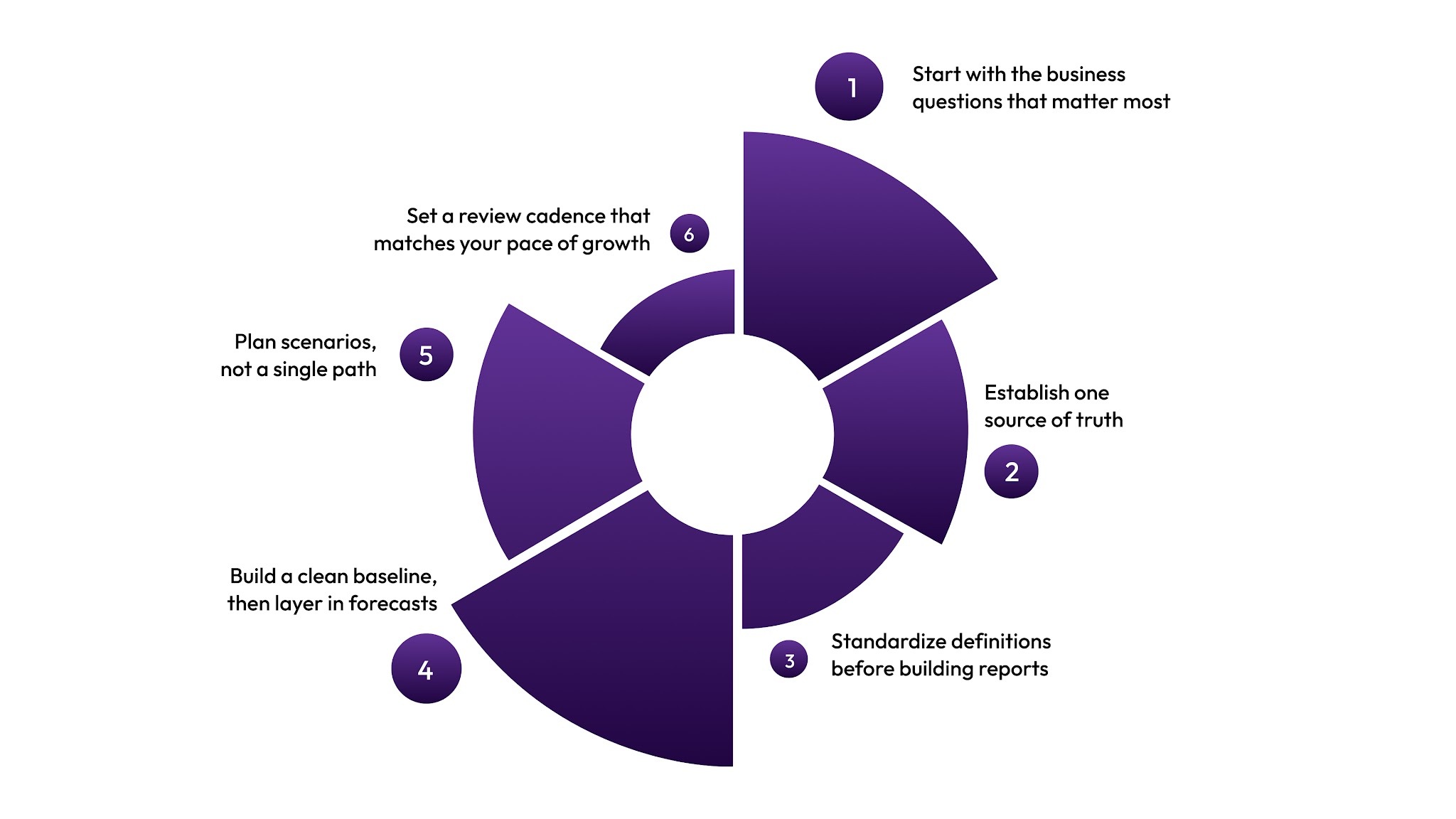
A framework turns scattered data into a repeatable planning process. Without one, you end up with dashboards nobody checks and numbers nobody trusts. Here is how to build one that actually sticks.
Step 1: Start with the business questions that matter most
Before collecting data, define what you need to answer.
- Which roles need to be filled in the next 90 days to hit revenue targets?
- Which teams are trending toward attrition?
- What does the headcount plan look like under three different growth scenarios?
The questions determine which data you collect and how you present it.
Step 2: Establish one source of truth
- Connect your HRIS, ATS, and finance system through native integrations or a unified platform.
- The goal is a single record that both HR and Finance work from.
Step 3: Standardize definitions before building reports
- Agree on what headcount, attrition, and cost per hire mean, in writing, before creating a single dashboard.
- This one step prevents most HR and Finance reporting conflicts.
Step 4: Build a clean baseline, then layer in forecasts
- Start with descriptive analytics.
- Once HR and Finance agree on the workforce as it stands today, add predictive models that use historical attrition rates and past hiring timelines to project future needs.
Step 5: Plan scenarios, not a single path
- Build a base case, a conservative case, and a stretch case.
- Scenario-based planning means your team can pivot when conditions shift without having to rebuild the model from scratch.
Step 6: Set a review cadence that matches your pace of growth
- Quarterly reviews are the minimum for most scaling teams. If you are in an active hiring phase, monthly reviews for revenue-critical roles keep the plan aligned with business reality.
Data hygiene note: Your analytics are only as good as the data flowing into them. If your ATS (Greenhouse, Lever) and HRIS (Workday, BambooHR) are not syncing consistently, you will be forecasting from incomplete records. Before building any model, audit your integrations and agree on a single system of record for each data type. Garbage in means garbage out, regardless of how sophisticated the analytics layer is.
How CandorIQ Enables Workforce Planning Analytics?
CandorIQ is a unified compensation and headcount planning platform designed for growth-stage companies in the U.S. It replaces fragmented workflows with a single connected system in which People and finance teams plan from the same live data and align on cost, strategy, and execution.
Here is what it delivers for your team:
- Real-Time Headcount Visibility: HR and Finance see a live view of planned vs. actual headcount and costs across teams, departments, and locations. When a role is approved or filled, the data updates immediately, without waiting for a monthly report.
- Headcount Scenario Planning: Model multiple hiring scenarios side by side and compare financial impact before committing to a path. CPOs can show leadership the cost of accelerating hiring. CFOs can stress-test the plan against slower growth. Both work from the same real-time model.
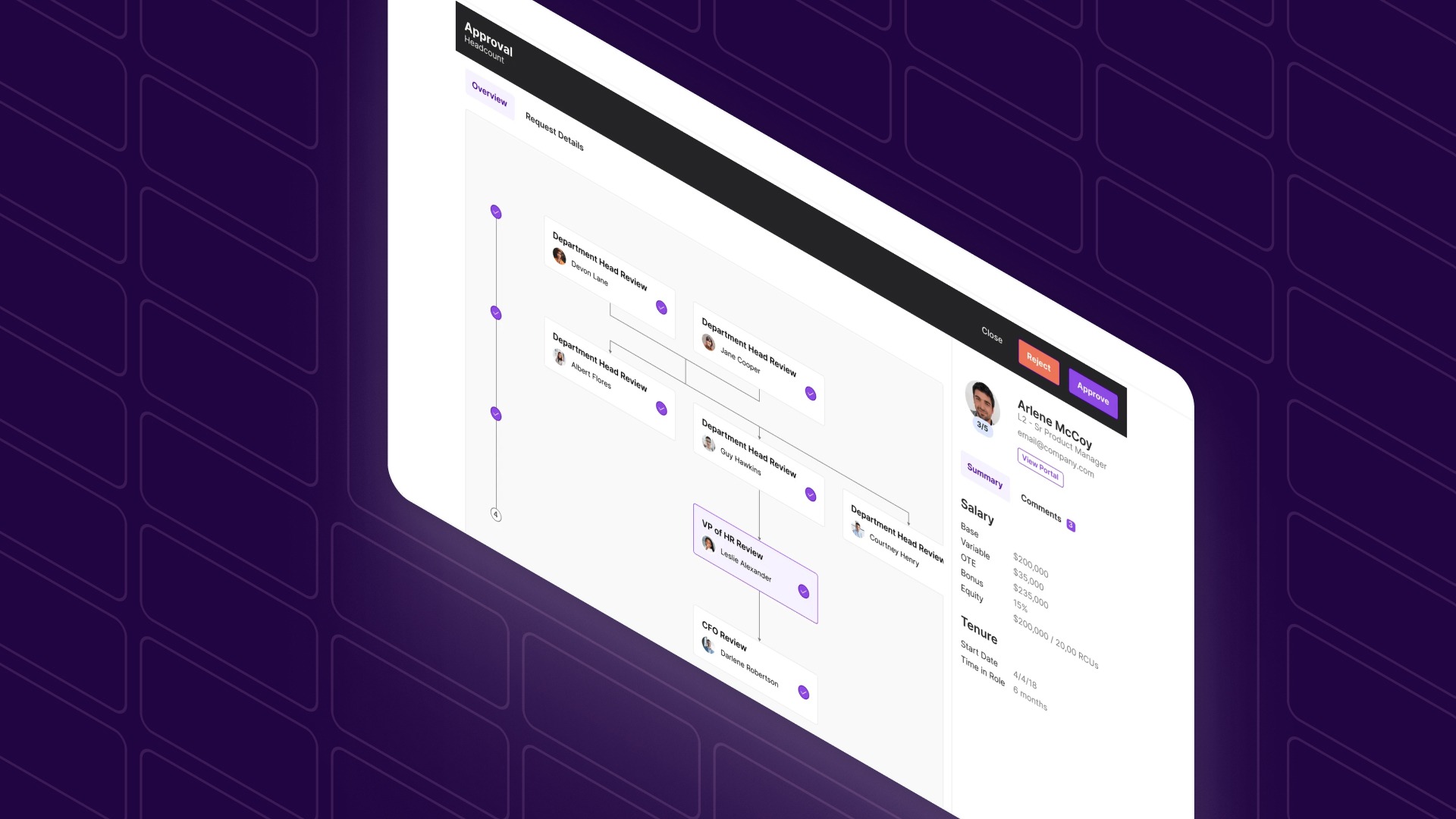
- Structured Headcount Requests and Approvals: Every headcount request moves through a workflow with embedded approval logic. Requests include role details, rationale, and cost modeling, and are routed automatically by team, location, or compensation level. Nothing gets lost in an email chain.
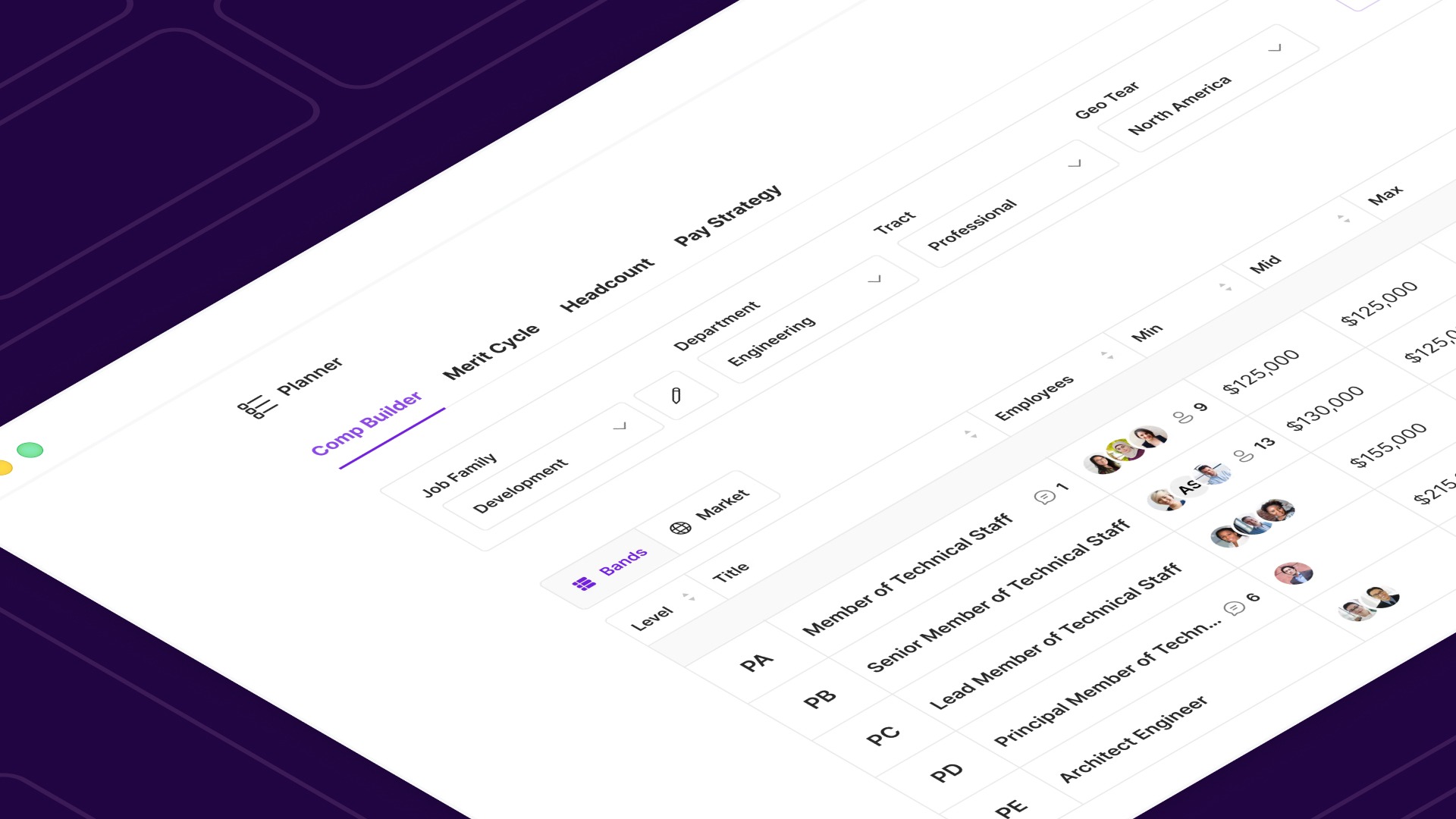
- Compensation and Pay Band Management: CandorIQ's Payband Builder lets HR define pay bands by level, location, and department. When headcount and compensation data live in the same system, projecting total people costs becomes a structured process rather than an estimate.
- Workforce Analytics and Custom Dashboards: Build dashboards for executives, HRBPs, or Finance that track attrition trends, compensation spend, and headcount against plan. CandorIQ's AI Agent answers natural language questions about workforce data, so your team spends less time pulling reports and more time acting on insights.
- HRIS and ATS Integration: CandorIQ connects directly to your existing HR systems. Approvals sync with your ATS, and compensation data stays aligned with your HRIS without manual reconciliation.
CandorIQ gives your HR and Finance teams a shared, real-time foundation for workforce decisions.
Conclusion
Workforce decisions shape how quickly a company can grow, adapt, and deliver on its strategy. Yet in many organizations, the data behind those decisions is still scattered across spreadsheets, reports, and disconnected systems.
Workforce planning analytics changes that dynamic. By connecting hiring plans, compensation data, and workforce trends into a single analytical view, teams gain the clarity needed to plan ahead rather than adjust after the fact.
For companies that are scaling headcount and managing increasingly complex workforce plans, the challenge is no longer understanding the value of workforce planning analytics. It is putting the right system in place to make those insights actionable.
CandorIQ is designed to support that shift by bringing headcount planning, compensation strategy, and workforce analytics into a single platform where People and Finance teams can plan together in real time.
See how CandorIQ helps growth-stage companies turn workforce planning analytics into faster, smarter hiring decisions. Book a demo
.png)
FAQs
1. How often should workforce planning analytics models be updated?
High-growth companies typically review workforce analytics monthly or quarterly. Frequent updates ensure hiring forecasts, attrition predictions, and workforce cost models reflect current business conditions and market hiring timelines.
2. Who usually owns workforce planning analytics inside a company?
Ownership typically sits between HR and Finance. People teams manage workforce data and talent insights, while Finance validates cost models and ensures hiring plans align with budgets.
3. Can workforce planning analytics predict skill shortages?
Yes. By analyzing hiring velocity, internal mobility, and attrition patterns, analytics models can reveal emerging skill gaps and help companies plan recruiting pipelines before shortages affect delivery.
4. What data sources are needed to run workforce planning analytics effectively?
Most models combine data from HRIS platforms, applicant tracking systems, compensation records, and finance systems. Integrating these sources enables organizations to link workforce decisions to operational and financial outcomes.
5. When should a company invest in workforce planning analytics?
Organizations usually adopt workforce analytics during rapid growth, restructuring, or talent shortages. These periods create pressure for better hiring forecasts, workforce visibility, and cost control across teams.
Ready to modernize your workforce and compensation strategy?
See how CandorIQ brings workforce planning and compensation together with AI.