

Measuring ROI of Compensation Management Software in 2026
Measure compensation software ROI by tracking cost savings, efficiency, and workforce outcomes to improve budgeting and compensation decisions effectively.

Most CFOs and FP&A leaders struggle to explain the real business impact of compensation tools. Budgets get approved, software gets implemented, but the outcomes remain difficult to quantify. In fact, a recent study shows 96% of FP&A professionals still rely on spreadsheets for planning and 93% for reporting on a daily or weekly basis. This creates a problem when leadership expects clear justification for every dollar spent on workforce technology.
Compensation management software introduces structure, but its value is often judged too narrowly. Many teams focus only on administrative efficiency or cost reduction, missing the broader impact on planning accuracy and decision quality. A more complete view looks at how compensation connects with headcount planning, budget control, and workforce outcomes.
This blog explores how to measure compensation software ROI using a structured approach.
In a nutshell:
- Compensation software ROI goes beyond cost savings and includes financial control, operational efficiency, and improved workforce planning decisions across HR and Finance.
- It matters because it improves budget visibility, speeds up compensation decisions, and strengthens alignment between workforce planning and financial strategy.
- Total cost of ownership includes more than subscriptions, covering implementation, data migration, integrations, training, and ongoing maintenance efforts.
- ROI is measured through metrics like cycle time, budget variance, approval speed, and error reduction, using a structured comparison of total costs and realized benefits over time.
- Measuring ROI is complex due to data fragmentation and indirect outcomes, so it requires standardized metrics, strong system integration, and continuous tracking to maintain accuracy.

What is Compensation Management Software ROI
Compensation management software ROI refers to the measurable business value generated from using structured systems to manage pay decisions and cycles. It includes both financial outcomes and operational improvements that affect workforce planning and execution.
Instead of focusing only on cost savings, ROI should reflect how well teams make compensation decisions, align with budgets, and manage headcount impact. This broader definition helps finance leaders evaluate whether the system supports better planning and control.
Why ROI Matters in Compensation Management Software
Understanding why ROI matters helps teams move beyond surface-level evaluation and make better compensation decisions. It shapes how HR and Finance assess impact, justify investments, and improve planning outcomes.
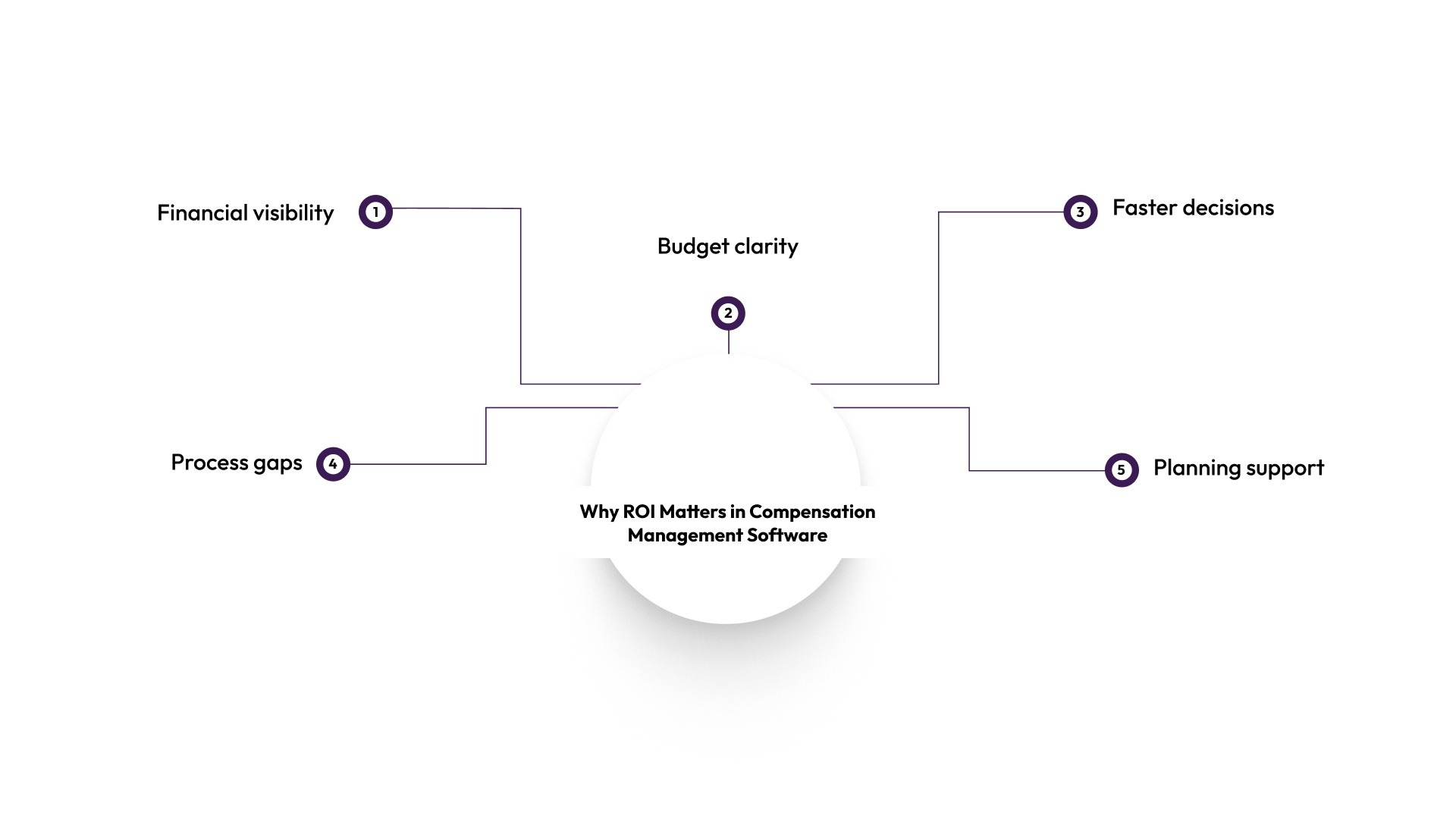
- Financial visibility: Helps finance leaders clearly see how compensation decisions impact total workforce spend. This makes it easier to track cost drivers and maintain better budget control.
- Budget clarity: Improves transparency during planning cycles by showing where compensation investments are effective. Teams can identify inefficiencies early and adjust allocations more confidently.
- Faster decisions: Supports quicker and more confident decisions by replacing assumptions with structured data. This reduces delays in compensation reviews and headcount approvals.
- Process gaps: Highlights inefficiencies in existing workflows, such as manual tracking or inconsistent approvals. Addressing these gaps helps reduce errors and improve operational efficiency.
- Planning support: Connects compensation strategy with hiring plans and workforce growth. This helps teams scale headcount while maintaining control over costs.
Key Cost Components Involved
Before measuring ROI, it’s important to understand the full cost of compensation management software. These costs go beyond the subscription fee and often include setup, adoption, and ongoing support.
- Software subscription cost: This is the recurring expense for using the platform. It typically varies based on team size, feature access, and usage levels.
- Implementation and configuration: Initial setup requires time and effort to configure pay bands, workflows, approval structures, and organizational hierarchies.
- Data migration and cleanup: Moving compensation data from spreadsheets or legacy systems involves cleaning, validating, and structuring information so it is accurate and usable.
- Training and change management: HR, Finance, and other stakeholders need onboarding and training to adopt new workflows effectively and reduce day-to-day errors.
- Internal admin and maintenance time: Ongoing effort is needed to manage user access, update compensation data, and support internal users across teams.
- Integration costs: Connecting the platform with HRIS, ATS, or payroll systems may require setup work, but it helps improve long-term data flow and operational efficiency.
- Ongoing support and optimization: Continuous vendor support, reporting refinements, and process improvements may add to the total cost over time.
A complete view of these components helps teams calculate ROI more accurately and avoid underestimating real-world investment.
Also Read: True Cost of Manual Compensation Management
Core Metrics to Measure ROI Effectively
Measuring ROI requires clear metrics that reflect both financial and operational outcomes. These metrics should align with the workflows that compensation software is designed to improve.
Here are the core metrics to focus on:
- Compensation cycle time: Measures how long it takes to complete salary review and approval cycles from start to finish. A shorter cycle reflects improved workflow efficiency and fewer coordination delays.
- Budget variance in compensation planning: Tracks the gap between planned compensation budgets and actual payouts. Lower variance indicates stronger forecasting accuracy and tighter financial control.
- Approval turnaround time: Captures the time taken for managers and stakeholders to approve compensation decisions. Faster approvals signal smoother workflows and fewer bottlenecks in decision-making.
- Error rate in compensation data: Measures inconsistencies, duplication, or manual mistakes in compensation records. Lower error rates reduce rework and improve trust in data quality.
- Time spent on compensation administration: Tracks the total effort HR and People Ops teams spend managing compensation cycles. Reduced time reflects better operational efficiency.
- Offer acceptance rate: Shows how often candidates accept compensation offers. Higher acceptance rates typically indicate stronger alignment with market benchmarks and internal pay consistency.
- Retention rate of key talent: Evaluates how well compensation structures support retention in critical roles. While influenced by multiple factors, compensation plays a meaningful role in retention outcomes.
- Visibility into workforce cost trends: Assesses how clearly teams can track compensation spend across roles and departments. Better visibility supports more proactive planning and financial decision-making.
These metrics provide a practical way to track ROI over time and identify areas where performance can be improved.
How to Calculate ROI of Compensation Management Software: Step-by-Step Process
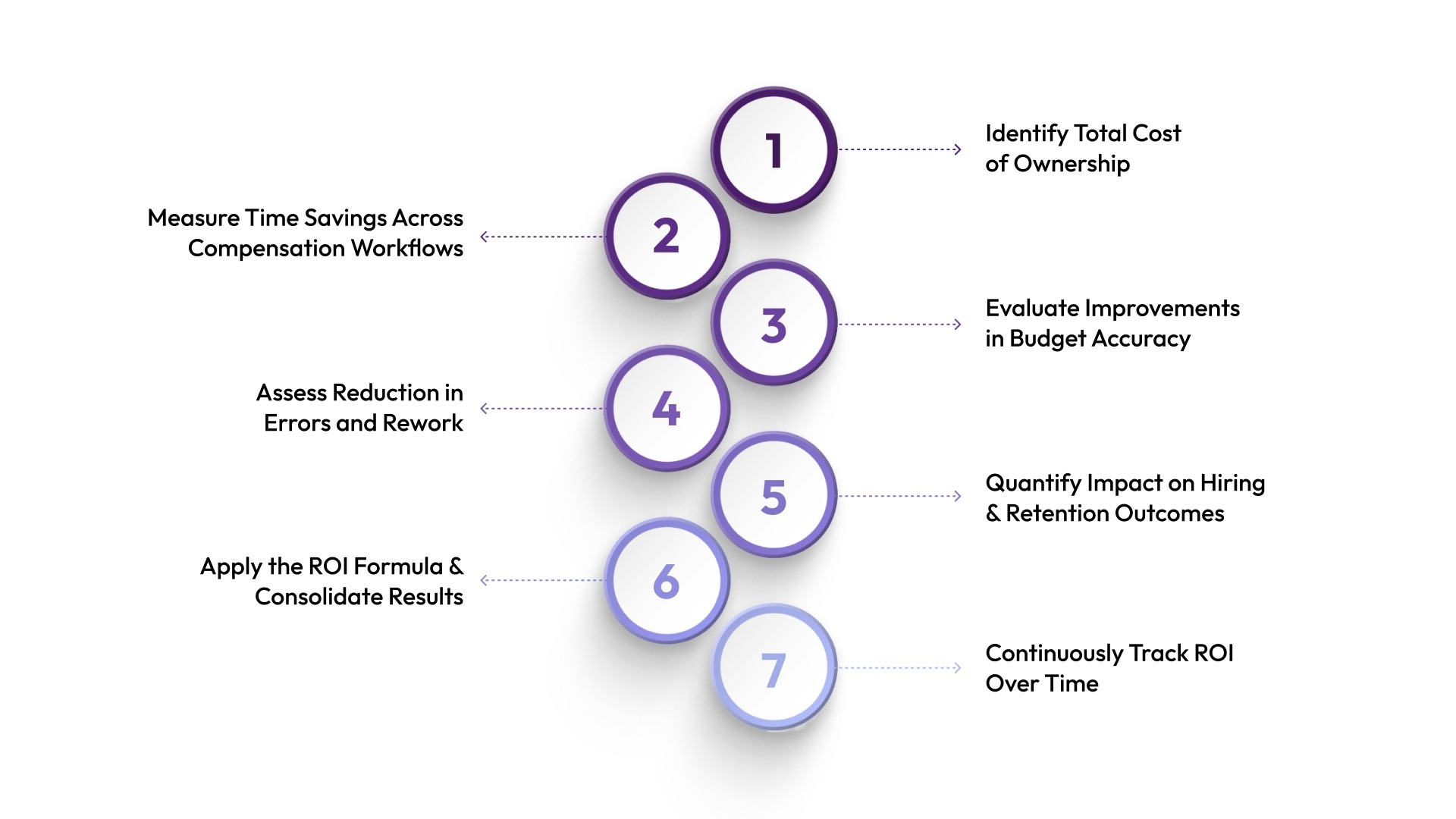
Calculating ROI requires a structured approach that combines cost analysis with measurable outcomes. This process helps teams move beyond assumptions and build a clear, data-driven case for their investment.
Step 1: Identify Total Cost of Ownership
Start by calculating the full cost of ownership, not just the subscription fee. This creates a realistic baseline for ROI comparison.
Include:
- Software licensing or subscription fees
- Implementation and onboarding costs
- Internal time spent on setup and training
- Integration costs with HRIS, ATS, or finance systems
These costs represent the total financial input required to run the system effectively.
From here, the goal is to compare this investment against measurable improvements in efficiency and decision-making.
Step 2: Measure Time Savings Across Compensation Workflows
Next, evaluate how much time the software saves across core compensation processes.
Compensation cycles, approvals, and data consolidation often take significant manual effort when handled in spreadsheets. Automation reduces coordination delays and repetitive administrative work.
What to measure:
- Reduction in compensation cycle preparation time
- Faster approval and review workflows
- Less time spent reconciling spreadsheets or fixing errors
These time savings can be translated into cost savings by multiplying saved hours by employee cost rates. This helps quantify operational efficiency improvements in financial terms.
Step 3: Evaluate Improvements in Budget Accuracy
Compensation software directly affects how accurately teams plan and track workforce spend. This is especially important for CFOs and FP&A teams.
To assess this:
- Compare planned vs. actual compensation spend over time
- Identify reductions in budget variance after implementation
- Measure the frequency of last-minute adjustments or corrections
Lower variance usually reflects better alignment between HR decisions and financial planning. It also reduces the risk of unexpected overspending during hiring or review cycles.
This step captures the financial control aspect of ROI.
Step 4: Assess Reduction in Errors and Rework
Manual compensation processes often lead to inconsistencies such as incorrect pay entries, outdated versions, or misaligned approvals.
To measure improvement:
- Track the number of compensation-related errors before and after adoption
- Estimate the time spent correcting those errors
- Include coordination effort across HR and Finance teams
Reducing errors does not just save time. It also improves trust in the system and reduces friction between teams during compensation reviews.
This step reflects how operational accuracy contributes to overall ROI.
Step 5: Quantify Impact on Hiring and Retention Outcomes
Compensation decisions influence both offer acceptance rates and employee retention, even if indirectly. While these are not purely software-driven, a better structure improves consistency.
To evaluate impact:
- Compare offer acceptance rates before and after implementation
- Monitor changes in early-stage attrition or voluntary exits
- Review consistency in compensation offers across similar roles
Even small improvements in retention reduce replacement and hiring costs over time. Similarly, consistent and transparent offers improve candidate conversion rates.
This step connects compensation management to workforce ROI.
Step 6: Apply the ROI Formula and Consolidate Results
Once costs and benefits are identified, you can calculate ROI using a simple formula.
ROI = (Total Benefits – Total Costs) / Total Costs
How to interpret results:
- A positive ROI indicates value gained from the investment
- Higher ROI suggests stronger efficiency, savings, or workforce impact
- Negative ROI signals underutilization or process gaps
It’s important to treat this as a consolidated view rather than a single snapshot. ROI improves as adoption and process maturity increase.
Step 7: Continuously Track ROI Over Time
ROI is not static. It evolves as teams adopt the software more deeply and optimize workflows.
Ongoing tracking helps identify where value is increasing and where gaps still exist.
Best practices for tracking:
- Review metrics after each compensation cycle
- Compare year-over-year improvements
- Adjust measurement criteria as processes mature
Continuous tracking keeps ROI aligned with business priorities, especially as compensation and headcount planning needs grow.
Also Read: Top Compensation Management Software Vendors in 2025
Common Challenges in Measuring ROI
Measuring ROI in compensation management is not always straightforward. Several challenges can make it difficult to capture the full value of software investments.
- Indirect benefits are hard to quantify: Improvements like better decision quality, stronger pay equity, or higher employee trust are real outcomes, but they don’t translate easily into clear financial numbers.
- Data is often spread across multiple systems: Compensation information may sit in spreadsheets, HRIS platforms, and finance tools separately, making it difficult to build a unified ROI view.
- Attribution is not always clear: Outcomes like retention or hiring success are influenced by multiple factors, making it hard to isolate the impact of compensation software alone.
- Lack of baseline metrics before implementation: Without pre-implementation benchmarks, measuring improvement or proving value over time becomes more difficult.
- Inconsistent tracking across teams: If HR and Finance do not follow a standard measurement approach, ROI calculations can vary and reduce reliability.
- Time lag in workforce outcomes: Benefits like improved retention or hiring efficiency often take time to reflect in data, delaying visible ROI impact.
Addressing these challenges requires a structured approach to data collection and analysis.
Best Practices to Maximize ROI from Compensation Software
Maximizing ROI requires more than implementing software. It depends on how effectively teams use the system in their workflows.
- Define clear outcomes before implementation: Set specific goals like faster compensation cycles, better budget accuracy, or improved pay visibility. This gives ROI a clear baseline for measurement.
- Standardize ROI metrics early: Align HR and Finance on shared metrics such as cycle time, forecast accuracy, and manual effort reduction to support consistent tracking.
- Strengthen HR and Finance collaboration: Use a shared source of compensation and headcount data to reduce misalignment and improve workforce planning decisions.
- Track financial and operational impact: Measure beyond cost savings by including efficiency gains, reduced manual work, and faster decision cycles.
- Improve data quality and integration: Keep compensation data clean and connected with HRIS, ATS, and finance systems to improve accuracy and reduce rework.
- Review processes regularly: Update workflows and approval structures as the organization scales to maintain relevance and effectiveness.
- Train teams for consistent adoption: Make sure all stakeholders use the platform correctly so data stays consistent and the system delivers full value.
- Use insights for decisions, not just reporting: Apply compensation and workforce data directly to planning, hiring, and budget decisions instead of only tracking performance.
For U.S. teams, keep documentation, salary ranges, and approval trails aligned with applicable state and local pay transparency requirements.
Following these practices helps teams move beyond basic usage and realize the full value of their investment.
How CandorIQ Helps You Measure and Maximize Compensation ROI
Managing compensation and headcount planning manually often leads to visibility gaps and inconsistent decisions. Teams struggle to connect compensation actions with financial outcomes, which makes ROI difficult to measure.
CandorIQ helps teams centralize these workflows, making it easier to track outcomes and evaluate ROI. By connecting pay decisions with workforce planning, it supports more accurate and aligned decision-making.
- Compensation & Payband Builder: Centralizes pay structures across roles and geographies, reducing inconsistencies and improving benchmarking accuracy for better financial control.
- Compensation Cycle: Automates merit and bonus workflows, reducing manual effort and improving visibility into budgets, approvals, and compensation spend.
- Employee Total Rewards: Gives employees a clear view of total compensation, improving transparency and supporting stronger retention outcomes.
- Headcount Scenario Planning: Helps model hiring and compensation costs together, improving budget alignment and decision-making before approvals.
- Headcount Requests & Approvals: Standardizes hiring requests and approval flows, reducing delays and improving tracking of hiring decisions and costs.
- Workforce Management: Consolidates workforce data like headcount, attrition, and spend, improving visibility into actual vs planned compensation costs.
- Candidate Offers: Creates structured, transparent offers with full compensation details, improving consistency and supporting better hiring outcomes.
- AI Agent: Enables faster analysis of compensation and workforce data, supporting forecasting, scenario modeling, and quicker decision-making.
Contact us today to see how CandorIQ can support clearer, faster, and more aligned workforce decisions.

FAQs
1. How long does it typically take to see positive ROI from compensation management software?
ROI timing varies by implementation scope, adoption speed, and the complexity of the current spreadsheet process. Many teams see the earliest gains in cycle time, approval speed, and admin effort reduction before broader workforce outcomes show up.
2. How can A/B testing validate ROI claims for compensation tools?
A/B testing compares outcomes between teams using the tool and those using legacy methods. Metrics like cycle time, pay accuracy, and retention help validate whether the software delivers measurable efficiency and financial improvements.
3. What post-implementation audits are recommended for ongoing ROI assessment?
Recommended audits include compensation cycle efficiency reviews, budget variance analysis, system usage tracking, and employee satisfaction checks. These ensure the tool continues delivering cost savings, process improvements, and alignment with compensation strategy.
4. How does cloud vs. on-premise deployment affect ROI timelines?
Cloud deployments can reach payback sooner when they reduce upfront infrastructure work and speed rollout. On-premise systems often take longer to stabilize because they usually require more setup, maintenance, and internal support.
5. What financial modeling techniques predict multi-year ROI?
Common techniques include Net Present Value (NPV), Internal Rate of Return (IRR), Total Cost of Ownership (TCO), and scenario-based forecasting. Sensitivity analysis also helps model different compensation and workforce growth conditions over time.
Ready to modernize your workforce and compensation strategy?
See how CandorIQ brings workforce planning and compensation together with AI.