

7 HRMS Analytics Gaps That Affect Hiring and Workforce Decisions
See how HRMS analytics supports workforce tracking but misses hiring and cost decisions. Learn key gaps and how teams improve planning with better data use.
.jpg)

Workforce decisions today carry higher expectations and tighter scrutiny.
72% of organizations say worker expectations are higher now, and 59% of HR teams are planning to bring AI into HR operations in 2025. Teams are expected to move faster while keeping hiring, compensation, and budgets aligned.
Most organizations already use HRMS analytics to track workforce data. The challenge begins when decisions need to be made:
- Hiring decisions move forward without full cost clarity.
- Compensation changes are reviewed without a budget impact.
- HR and Finance work from different data.
- Approvals slow down due to manual validation.
This is where planning becomes harder to manage.
This guide explains how HRMS analytics works, where it helps, and how to connect it to workforce planning decisions.
Key Takeaways
- HRMS analytics improves visibility across hiring, performance, and retention, but does not connect workforce data to hiring cost impact or budget decisions, limiting its role in planning.
- The biggest breakdown happens at decision points, where hiring, compensation, and budget are evaluated separately, forcing teams to rely on manual validation and disconnected tools.
- Core HRMS limitations include the inability to model full hiring costs, simulate workforce scenarios, and track plan versus actual spend, reducing confidence in financial planning.
- Common HRMS reports like headcount, attrition, and cost-per-hire remain descriptive, providing visibility but not guiding what actions to take or which decisions to approve.
- Teams that connect workforce data with planning workflows can reduce approval delays, improve cost control, and move from reactive reporting to structured decision-making.
What Is HRMS Analytics and What Does It Actually Do?
HRMS analytics is the structured analysis of workforce data within a Human Resource Management System (HRMS), combining payroll, recruitment, and performance datasets to produce measurable workforce insights. It allows reporting, pattern detection, and limited forecasting, but primarily focuses on operational visibility rather than financial or planning-level decision support.
Core functions HRMS analytics performs inside a typical system:
- Data Aggregation: Combines payroll, hiring, and performance data into a single system for consistent reporting.
- Dashboard Reporting: Displays metrics like headcount, attrition, and hiring pipelines in real time.
- Benchmarking: Compares internal workforce metrics against historical or external data.
- Analytics Models: Uses descriptive, diagnostic, predictive, and prescriptive methods to analyze trends.
- Lifecycle Tracking: Tracks hiring, performance, engagement, and exits across employee groups.
HRMS analytics structures workforce data effectively, but does not connect insights directly to compensation planning or hiring decisions.
When workforce data needs to translate into actual decisions, system capabilities start to matter. See how leading platforms approach this in top 6 people management systems to consider in 2025.
.png)
Where HRMS Analytics Supports Workforce Cost Visibility Today
HRMS analytics helps finance teams track workforce trends across hiring, retention, and performance, improving visibility into how headcount changes over time. It supports better monitoring of workforce movement, but does not quantify cost impact or guide budget decisions before approvals.
Key areas where it supports financial visibility:
- Hiring Channel Performance: Identifies which sources produce higher retention, improving long-term cost efficiency of hires.
- Attrition Tracking: Highlights turnover patterns that impact replacement hiring costs and workforce stability.
- Risk Monitoring: Surfaces employee relations issues that can lead to legal or compliance-related costs.
- Performance Distribution: Identifies rating inconsistencies that may affect compensation allocation.
- Engagement Trends: Detects shifts that can influence retention cost and future hiring demand.
HRMS analytics improves visibility into workforce changes, but does not connect these changes to budget impact or approval decisions.
Tracking hiring and workforce data is one part, but how systems support execution varies widely. Compare approaches in the best HRIS examples for 2025: top systems and features
7 Times Where HRMS Analytics Breaks for Compensation and Headcount Decisions
HRMS analytics breaks at critical decision points where workforce data must translate into financial outcomes. While it captures employee and compensation data, it cannot model hiring cost impact, align compensation with headcount plans, or simulate budget scenarios, forcing finance teams to rely on disconnected tools and manual calculations.
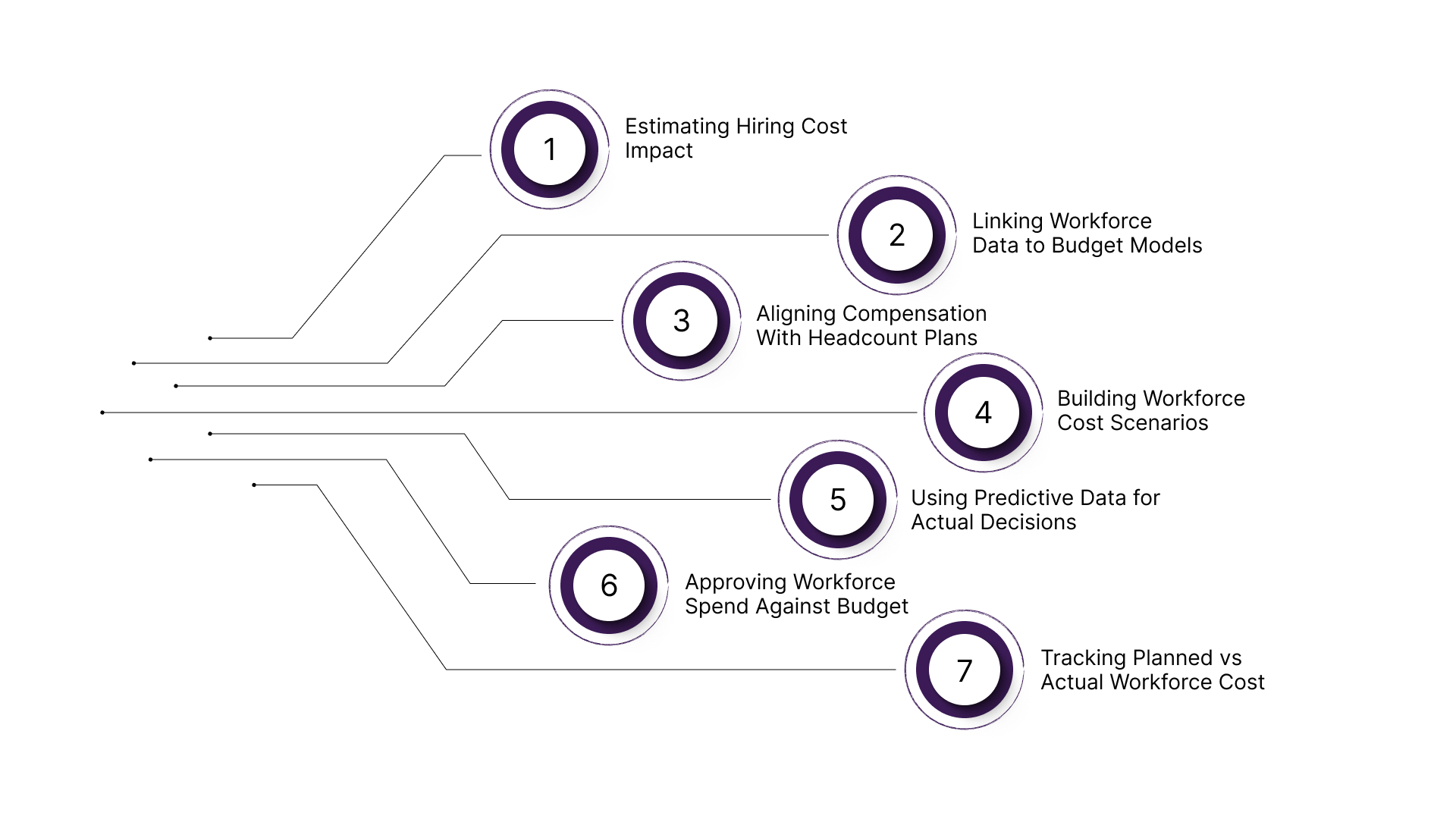
1. Estimating Hiring Cost Impact
HRMS analytics cannot calculate the full cost of hiring decisions, including base salary, variable pay, benefits, and timing impact across budget periods, limiting finance visibility during planning.
Breakpoints in hiring cost estimation:
- Incomplete Cost Components: HRMS excludes variable pay, benefits, and employer costs, preventing accurate total compensation calculation per hire.
- No Time-Based Allocation: Hiring costs are not distributed across financial periods like quarters, impacting budget forecasting accuracy.
- Static Salary Inputs: Compensation data is not dynamically adjusted for new offers or role-specific variations.
Hiring cost estimation remains incomplete, forcing finance teams to approximate workforce spend without reliable, system-generated cost projections.
2. Linking Workforce Data to Budget Models
HRMS analytics stores workforce data but does not integrate with financial planning models, preventing alignment between headcount changes and budget forecasts.
Breakpoints in data-to-budget linkage:
- No Cost Center Mapping: Employee data is not consistently mapped to financial cost centers, limiting budget allocation tracking.
- Disconnected Financial Models: Finance builds separate models outside HRMS, leading to inconsistent assumptions.
- Lack of Real-Time Sync: Workforce changes are not reflected instantly in financial forecasts, causing planning delays.
Without direct linkage to financial models, HRMS data cannot support budget-driven workforce planning decisions.
3. Aligning Compensation With Headcount Plans
HRMS analytics treats compensation and hiring as separate datasets, making it difficult to evaluate the combined workforce cost impact during planning.
Breakpoints in alignment:
- Separate Workflows: Compensation adjustments and hiring approvals occur independently without unified cost evaluation.
- No Aggregated Cost View: Systems cannot calculate total workforce cost across roles, levels, and departments simultaneously.
- Inconsistent Compensation Assumptions: Salary decisions vary without standardized modeling across hiring plans.
This misalignment leads to fragmented decisions where hiring and compensation are evaluated without a consolidated view of total workforce spend.
4. Building Workforce Cost Scenarios
HRMS analytics lacks the ability to simulate multiple hiring and compensation scenarios, limiting finance teams’ ability to compare options before committing budget.
Breakpoints in scenario modeling:
- No Scenario Comparison Engine: Cannot evaluate alternative hiring plans or compensation structures side by side.
- Manual Scenario Creation: Finance must build multiple models in spreadsheets, increasing effort and inconsistency.
- Limited Sensitivity Analysis: Systems cannot test how changes in salary or hiring timing affect total cost.
Without scenario modeling, finance teams cannot evaluate trade-offs, leading to decisions made without full visibility into cost implications.
5. Using Predictive Data for Actual Decisions
HRMS predictive analytics forecasts trends, but does not translate those forecasts into actionable financial decisions or approval workflows.
Breakpoints in predictive usage:
- Trend-Only Forecasting: Predicts attrition or hiring needs without linking outcomes to financial impact.
- No Decision Simulation: Cannot model how predicted changes affect workforce cost or budget thresholds.
- Data Dependency Risks: Predictive accuracy depends on large datasets, reducing reliability in fragmented environments.
Predictive insights remain informational, requiring additional systems to convert forecasts into decision-ready financial models.
6. Approving Workforce Spend Against Budget
HRMS analytics does not provide real-time visibility into how hiring or compensation decisions impact approved budgets at the moment of approval.
Breakpoints in approval workflows:
- No Budget Constraint Checks: Systems do not validate decisions against predefined budget limits.
- Delayed Cost Visibility: Financial impact is calculated after approvals, not during decision-making.
- Manual Approval Dependencies: Finance teams rely on external validation before approving workforce changes.
This creates approval delays and increases the risk of exceeding workforce budgets due to incomplete cost visibility.
7. Tracking Planned vs Actual Workforce Cost
HRMS analytics cannot consistently track the difference between planned workforce spend and actual execution, limiting financial control post-decision.
Breakpoints in tracking:
- No Plan vs Actual Comparison: Systems do not align planned hiring costs with real-time spend.
- Fragmented Reporting: Workforce cost data is split across HRMS and financial systems.
- Limited Variance Analysis: Finance cannot easily identify deviations between forecasted and actual workforce costs.
Without continuous tracking, finance teams lose control over workforce spend, making it difficult to correct course after decisions are executed.
If hiring cost, compensation changes, and budget approvals are still evaluated separately, these gaps are already affecting decision speed and cost control.
The 4 Types of HRMS Analytics (And Why They’re Not Enough Alone)
HRMS analytics operates across four levels: descriptive, diagnostic, predictive, and prescriptive, each answering a different workforce question using structured employee data. While they improve visibility and insight generation, none connect analytics outputs to compensation structures or headcount cost decisions, limiting their usefulness for finance-led planning and approvals.
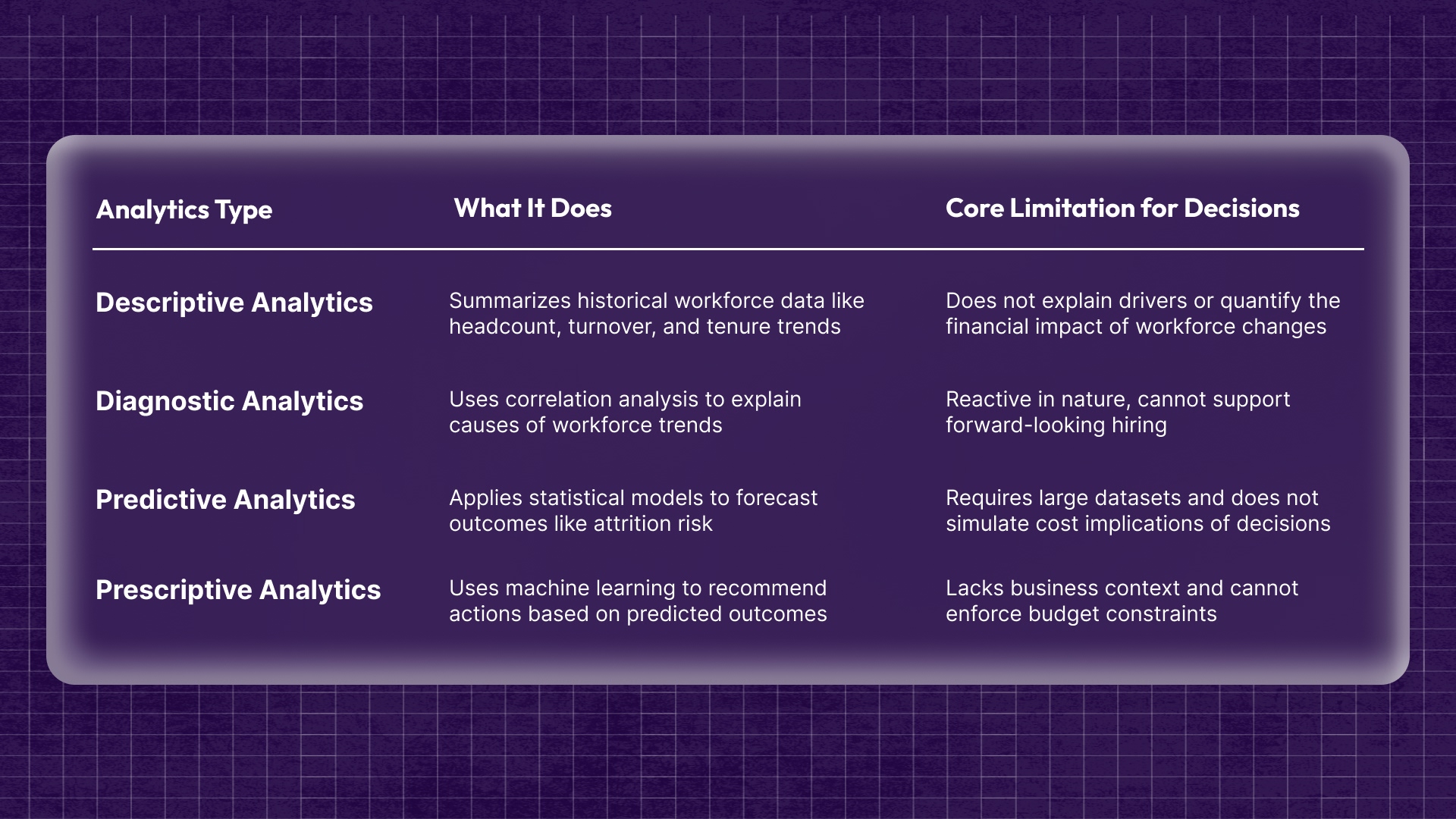
Breakdown of analytics types and where they fall short for decision-making:
Each analytics type answers isolated workforce questions, but without integration into cost modeling and planning workflows, they cannot support real-time compensation or headcount decision-making.
Visibility improves reporting, but outcomes depend on how systems support real workforce actions. See how this plays out in the key benefits of HRIS for employers and employees.
Common HRMS Analytics Reports and Why They Don’t Drive Decisions
HRMS analytics reports give a clear view of workforce activity like hiring, attrition, and engagement. But they mostly show what has already happened. Without connecting to cost, impact, or next steps, these reports rarely help teams make confident compensation or hiring decisions.
.jpg)
Common reports and where they fall short in real decisions:
- Headcount And Vacancy Reports: Show team size and open roles, but do not explain hiring impact on budget or priorities.
- Time-To-Hire And Cost-Per-Hire Reports: Track hiring speed and cost, but do not help decide if a role should be approved.
- Turnover And Attrition Reports: Show who left, but not what action to take or how it affects future hiring plans.
- Engagement And Sentiment Reports: Reflect employee feedback, but do not guide changes in compensation or team structure.
- Compliance and Diversity Reports: Track policy and representation, but do not support hiring or pay decisions directly.
These reports help teams stay informed, but without linking to decisions, they stop at visibility instead of guiding what to do next.
How to Connect HRMS Analytics to Workforce Planning Decisions
Connecting HRMS analytics to workforce planning means converting workforce data into hiring, structure, and spend decisions that can be evaluated before approval. This requires linking headcount, attrition, hiring pipelines, and skills data with cost impact, timing, and business targets so teams can plan capacity, budget, and roles with clarity.
- Define baseline: Map current headcount, open roles, and total workforce cost by function, level, and location.
- Identify drivers: Analyze attrition, mobility, and hiring velocity to understand what is changing workforce capacity.
- Forecast demand: Project future roles and hiring timelines based on growth plans and historical trends.
- Align skills: Compare current capabilities with planned roles to identify hiring or upskilling needs.
- Link to decisions: Translate plans into cost, timing, and approval-ready hiring and compensation actions.
HRMS analytics becomes valuable when workforce data is used to evaluate hiring and budget impact before decisions are finalized.

Common Mistakes Teams Make with HRMS Analytics
Teams often struggle with HRMS analytics not because of tool limitations, but due to how data is used, interpreted, and applied to decisions. Misaligned metrics, inconsistent data, and a lack of clear decision frameworks prevent teams from turning workforce insights into actionable hiring, compensation, or planning outcomes.
Frequent mistakes that reduce the effectiveness of HRMS analytics:
Most teams fail not due to a lack of data, but because analytics is not structured around decisions, leading to visibility without clear action or accountability.
How CandorIQ Helps Turn HRMS Analytics Into Planning Decisions
CandorIQ turns HRMS analytics into decision-ready workflows by connecting workforce data with compensation structures, hiring plans, and budget impact. Instead of static reports, teams can model scenarios, run approvals, and evaluate workforce decisions in real time, improving speed, accuracy, and alignment between HR and Finance.
Key products that convert workforce data into planning decisions:
- Headcount Scenario Planning:
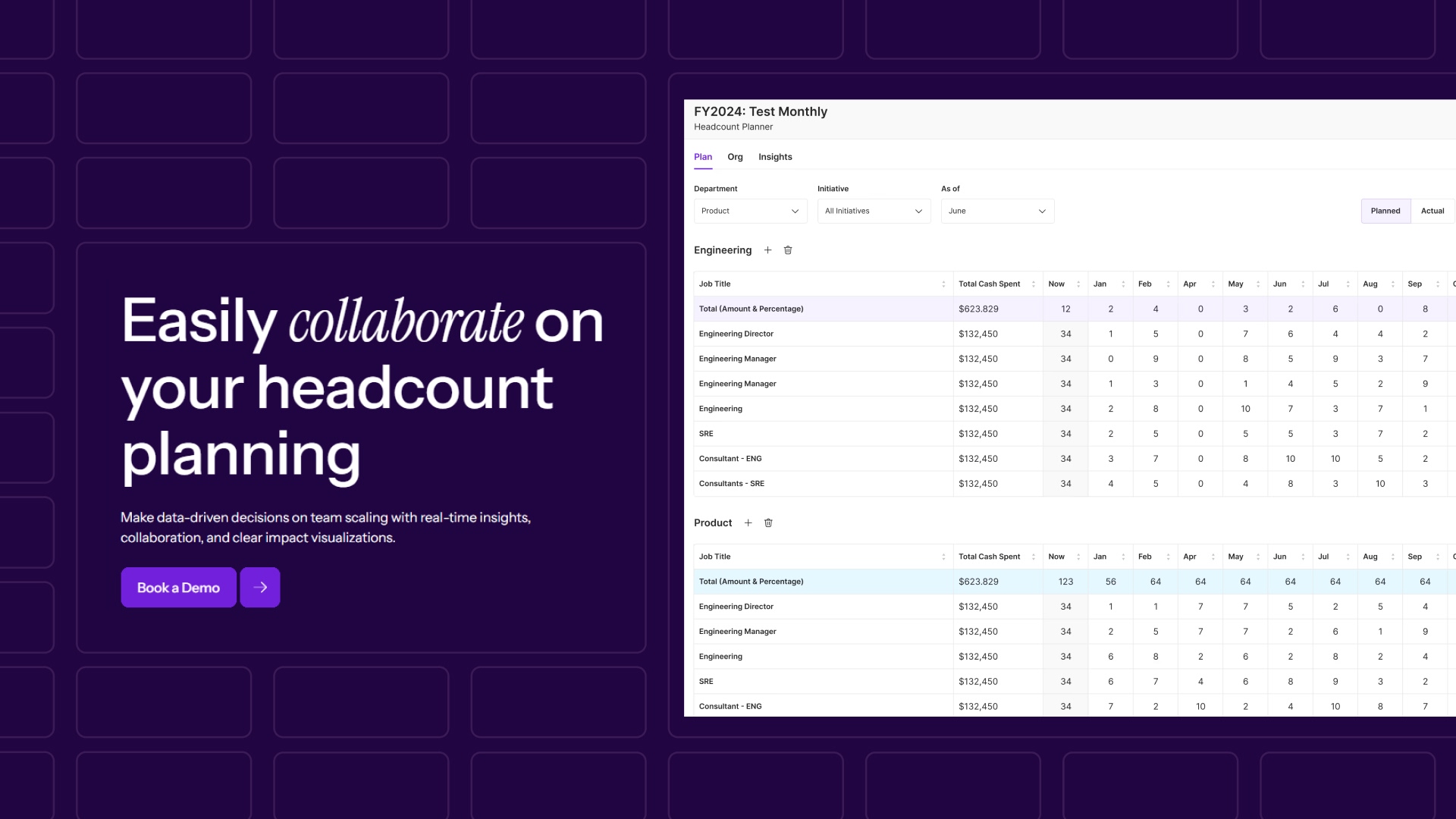
- Avoid overhiring and budget overruns by modeling hiring plans against real cost impact before approvals. Teams can test different growth scenarios, compare trade-offs across roles or locations, and understand how each decision affects total spend.
- This ensures hiring plans are financially sound before execution, not corrected after.
- Headcount Requests And Approvals:
.jpg)
- Reduce approval delays by replacing fragmented requests across spreadsheets, email, and Slack with structured workflows tied to budget and role context. Every stakeholder can see what is being requested, why it matters, and what it will cost.
- This keeps hiring decisions aligned with business priorities while removing back-and-forth and manual validation.
- Compensation & Payband Builder:
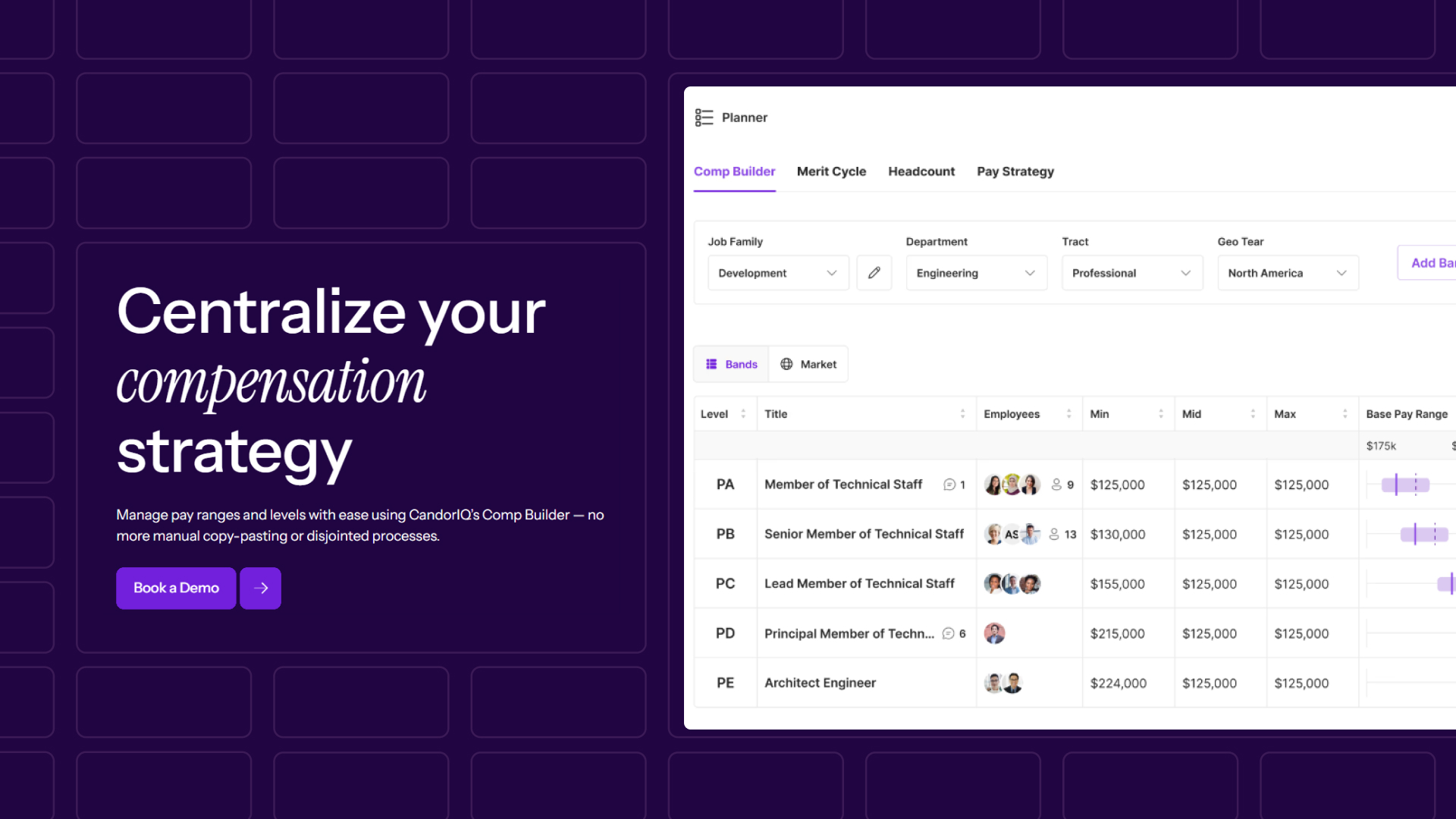
- Prevent pay inconsistencies by building salary ranges using market benchmarks and mapping employees to structured pay bands. Teams can quickly identify gaps, compression issues, and misalignment across roles or geographies.
- This leads to more consistent offers, fewer corrections during cycles, and stronger internal pay equity.
- Compensation Cycle:
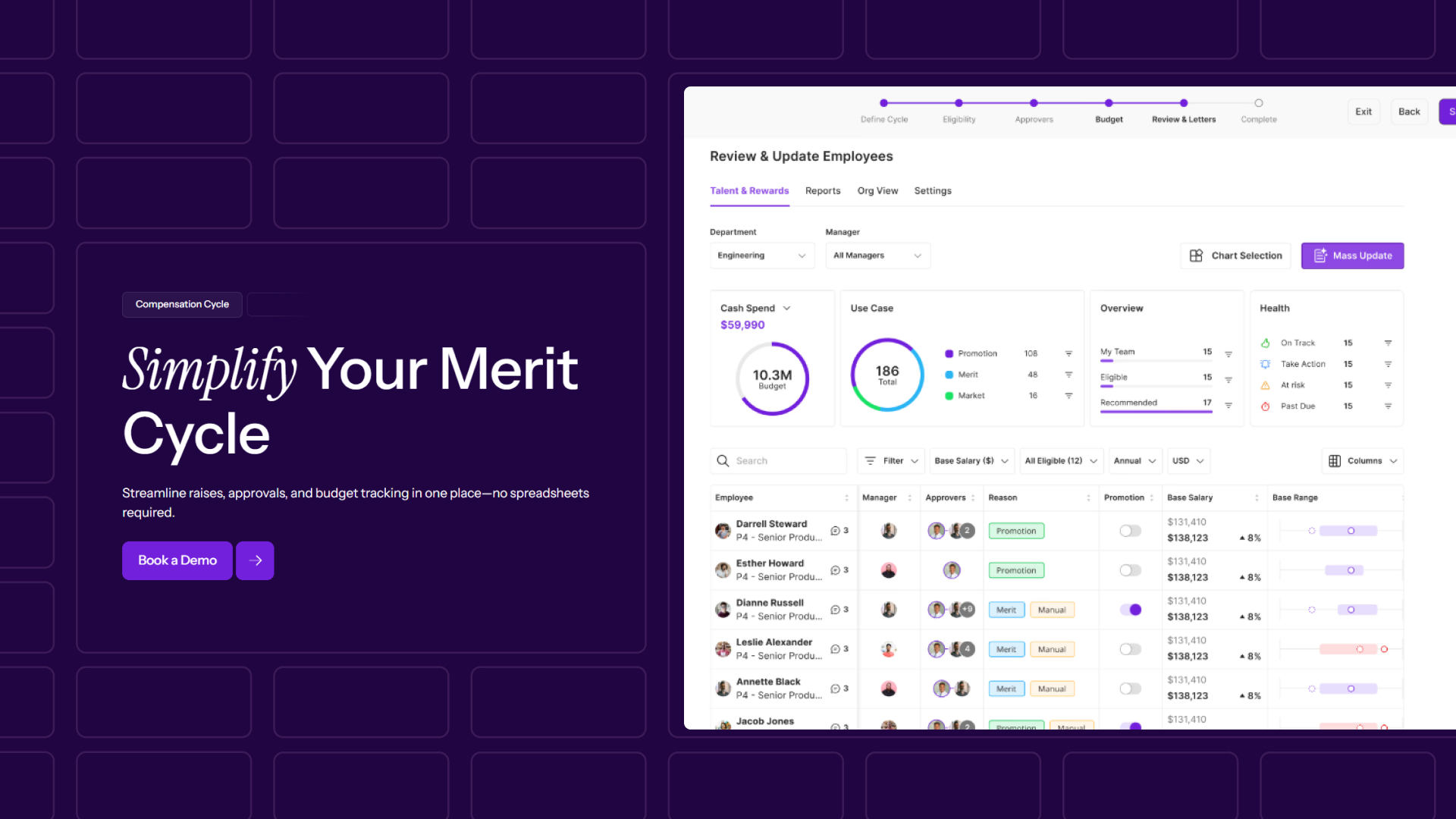
- Run merit cycles in one system with built-in recommendations, spend tracking, and reporting. Teams no longer rely on manual files to track increases, approvals, or budget usage.
- This helps complete cycles faster, maintain control over compensation spend, and ensure decisions stay aligned across managers and departments.
- AI Agent:
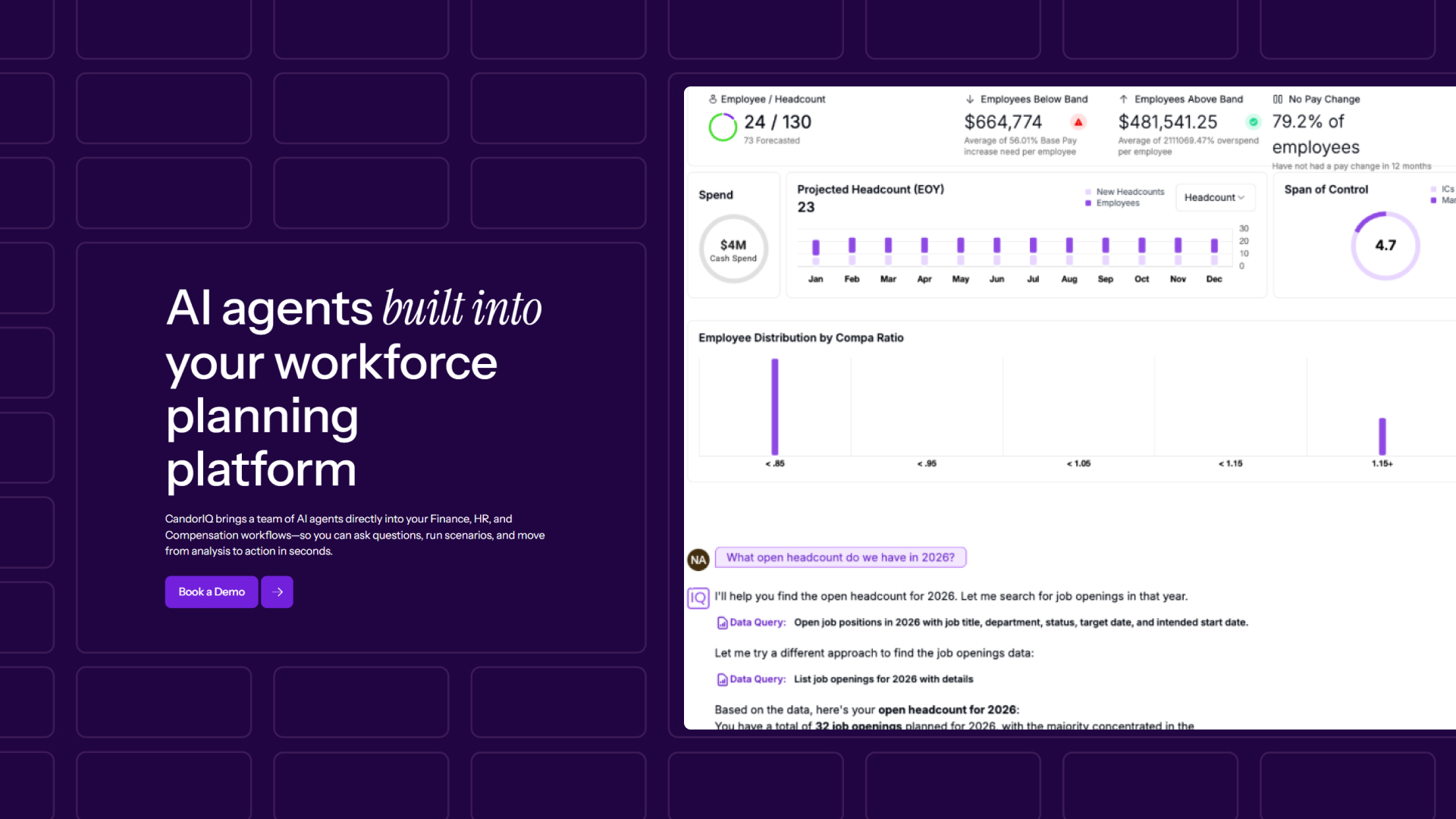
- Identify risks earlier by analyzing workforce, compensation, and budget trends in real time. The system surfaces insights on pay gaps, retention risks, and cost changes without requiring manual analysis.
- This allows teams to move from reactive reporting to proactive decision-making, acting before issues impact hiring or retention.
If your team still validates hiring and compensation decisions across spreadsheets or multiple systems, delays and cost gaps are already part of your process.
CandorIQ helps teams:
- Reduce hiring approval time by up to 50%
- Run compensation cycles 2.5x faster
- Save $500K+ annually in headcount costs

FAQs
1. How does HRMS analytics impact hiring approvals in practice?
HRMS analytics provides hiring data, but does not show real-time cost impact, which makes approvals slower when finance needs to validate the budget separately.
2. Why does HRMS analytics fail to support compensation planning decisions?
HRMS analytics tracks salary data, but does not model how compensation changes affect total workforce spend or future budget allocations.
3. Can HRMS analytics help align HR and Finance teams?
Analytics for HR improves data visibility, but alignment still depends on how that data is connected to shared planning and approval workflows.
4. What are the limitations of HRMS analytics for workforce budgeting?
HRMS analytics does not calculate forward-looking workforce cost across hiring plans, making it difficult to track budget impact before decisions are finalized.
5. How reliable is HRMS analytics for forecasting workforce needs?
HR analysis can identify trends, but accuracy depends on data consistency and does not account for changing business priorities or budget constraints.
6. Why do teams still rely on spreadsheets despite using HRMS analytics?
HRMS analytics lacks scenario modeling and cost evaluation, so teams export data to spreadsheets to manually assess hiring and compensation decisions.
7. How does HRMS analytics handle compensation benchmarking?
HRMS analytics may include benchmarking data, but it often lacks real-time updates and does not integrate benchmarks directly into approval workflows.
8. What should teams use alongside HRMS analytics for better decisions?
Teams typically need systems that connect HRMS analytics with compensation planning, headcount modeling, and budget evaluation to support decision-making.
Ready to modernize your workforce and compensation strategy?
See how CandorIQ brings workforce planning and compensation together with AI.